
NAVIGATION SYSTEM: DESCRIPTION AND OPERATION (page 2 of 9)
- Make
- Land Rover
- Model
- Discovery II
NAVIGATION SYSTEM
DESCRIPTION AND OPERATION
87-3
Navigation Computer
The navigation computer is installed in the DIN radio slot in the fascia. A spring loaded catch on each side of the
navigation computer secures it in position. Slide tools, installed in slots at the bottom front corners of the navigation
computer, are required to unlock the catches during removal.
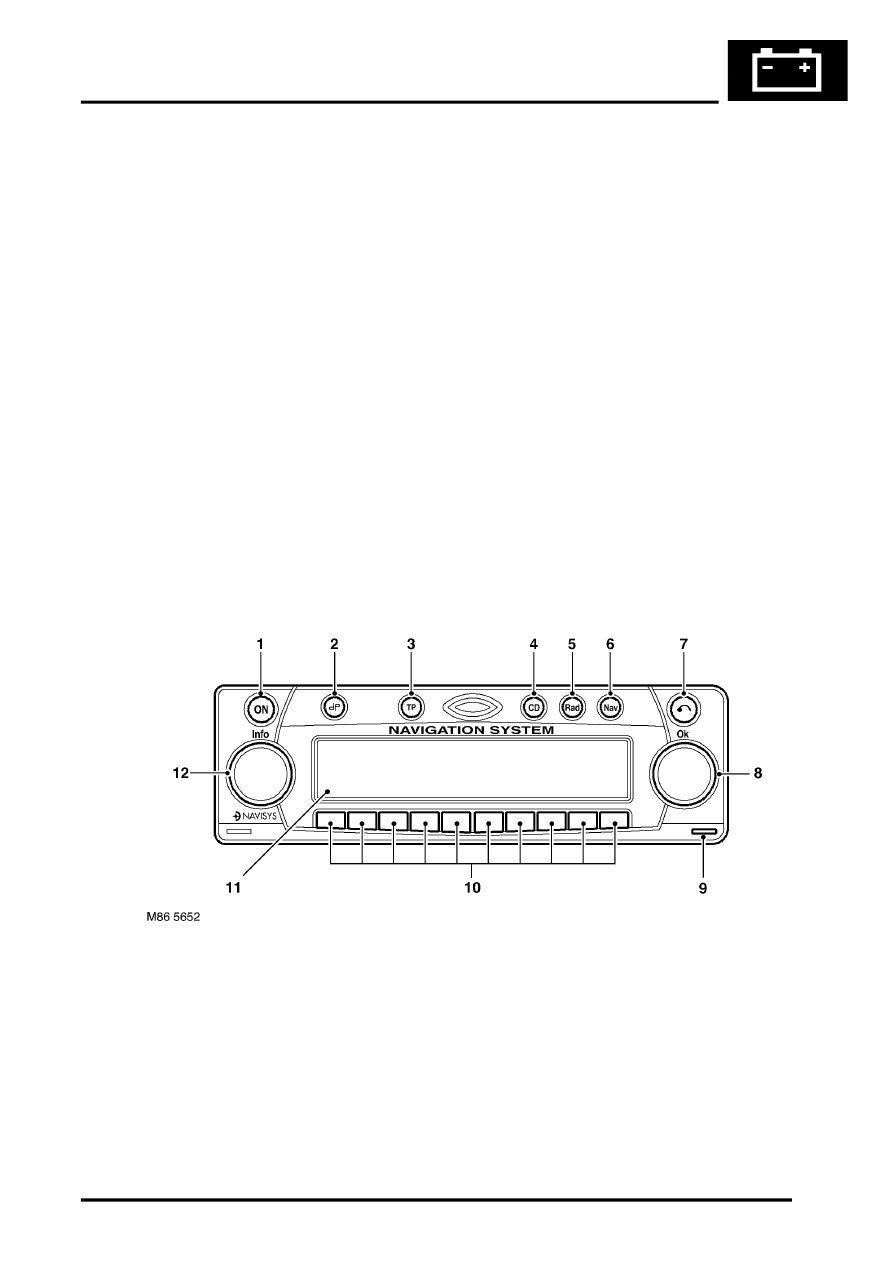
The navigation computer contains all the hardware and software required for control of the navigation, radio and CD
systems, including the GPS receiver and a solid state piezo gyro for the navigation system. The piezo gyro measures
the motion of the vehicle around its vertical axis.
The controls for the navigation computer are all located on the front panel of the unit. The centre section of the front
panel hinges to allow access to the CD player and, for security purposes, can be removed from the unit. The controls
perform the following functions:
l
On/Off (ON) button, for switching the unit on and off.
l
Tone button, for activating the tone menu to adjust bass, treble, balance, fade and loudness functions.
l
Traffic Programme (TP) button, for activating the traffic information programme menu (Europe only).
l
Compact Disc (CD) mode button, for selecting CD operation.
l
Radio (Rad) mode button, for selecting radio operation and tuning menus.
l
Navigation (Nav) mode button, for entry and exit of the navigation menu and service mode.
l
CD eject button, opens the removable panel and ejects the CD.
l
RH rotary control, scrolls through menus when turned and enters a selection when pressed. Also mutes audio
navigation instructions when pressed in navigation mode.
l
Multifunction buttons, for entering the security code and menu selections.
l
Liquid Crystal Display (LCD), green screen that displays navigation, radio and CD information.
l
LH rotary control, adjusts volume when turned. When pressed, restores, repeats or interrupts audio navigation
instructions or provides destination details.
1 On/Off button
2 Tone button
3 Traffic programme button (Europe only)
4 CD mode button
5 Radio mode button
6 Navigation mode button
7 CD eject button
8 RH rotary control
9 Release tool slot
10 Multifunction buttons
11 LCD
12 LH rotary control
Parts & tools for this job Staging For Land Rover Discovery
- TOOLTorque wrenchSearch: 3/8 inch torque wrench
- TOOLSocket setSearch: socket set metric
- BOOKHaynes manualSearch: Haynes manual Land Rover Discovery
Links open Amazon search results in a new tab. As an Amazon Associate I earn from qualifying purchases.