Workshop Manuals Factory service & repair Land Rover
01 100-00 General Information02 100-00 Index03 100-01 Identification Codes04 100-02 Jacking Lifting05 100-03 Maintenance Schedules06 204-00 Suspension General Info07 204-01 Front Suspension08 204-02 Rear Suspension09 204-04 Wheels & Tires10 204-05 Vehicle Dynamic Suspension11 204-06 Ride & Handling Optimization12 205-01 Driveshafts13 205-02 Rear Drive Axle/Differential14 205-03 Front Drive Axle Differential15 205-04 Front Drive Halfshafts16 205-05 Rear Drive Halfshafts17 206-00 Brakes General Info18 206-03 Front Brake Disc19 206-04 Rear Brake Disc20 206-05 Parking Brake And Actuation21 206-06 Hydraulic Brake Actuation22 206-07 Power Brake Actuation23 206-09A Anti-Lock Control - Traction Control24 206-09B Anti-Lock Control - Stability Assist25 211-00 Steering System- General Info26 211-02 Power Steering27 211-03 Steering Linkage28 211-04 Steering Column29 211-05 Steering Column Switches30 Engine Diagnosis And Testing31 303-01A Engine- 4.0L32 303-01B Engine- 4.4L33 303-01C Engine- 2.7L Diesel34 303-03A Engine Cooling- 4.0L35 303-03B Engine Cooling- 4.4L36 303-03C Engine Cooling- 2.7L Diesel37 303-04A Fuel Charging And Controls- 4.0L38 303-04B Fuel Charging And Controls- 4.439 303-04C Fuel Charging And Controls- 2.7L40 303-04D Fuel Charging And Controls-Turbo- 2.741 303-05A Accessory Drive- 4.0L42 303-05B Accessory Drive- 4.4L43 303-05C Accessory Drive- 2.7L44 303-06A Starting System- 4.0L45 303-06B Starting System- 4.4L46 303-06C Starting System- 2.7L Diesel47 303-07A Engine Ignition- 4.0L48 303-07B Engine Ignition- 4.4L49 303-07C Glow Plug System50 303-08A Engine Emission Control 4.0L51 303-08B Engine Emission Control 4.4L52 303-08C Engine Emission Control 2.7 Diesel53 303-12A Intake Air Distrbution And Filtering -4.0L54 303-12B Intake Air Distribution And Filtering- 4.4L55 303-12C Intake Air Distribution And Filtering- 2.7 D56 303-13A Evaporative Emissions- 4.0L57 303-13B Evaporative Emissions- 4.4L58 303-14A Electronic Engine Controls- 4.0L59 303-14B Electronic Engine Controls- 4.4L60 303-14C Electronic Engine Controls- 2.7L Diesel61 307-01A Automatic Transmission, Transaxle- 4.0L62 307-01B Automatic Transmission, Transaxle- 4.4L63 307-01C Automatic Transmission, Transaxle-2.7L Diesel64 307-02A Transmission, Transaxle Cooling- 4.0L65 307-02B Transmission, Transaxle Cooling- 4.4L66 307-05A Auto Transmission, Transaxle External Controls- .0L67 307-05B Auto Transmission, Transaxle External Controls- .4L68 307-05C Auto Transmission, Transaxle External Con.7L Diesel69 308-00 Manual Transmission, Transaxle And Clutch70 308-01 Clutch- 2.7 Diesel71 308-02 Clutch Controls- 2.7L Diesel72 308-03 Manual Transmission, Transaxle- 2.7L Diesel73 308-06 Manual Transmission, Transaxle External Control.7L Diesel74 308-07A Four-Wheel Drive Systems75 308-07B Transfer Case76 309-00A Exhaust System 4.0L77 309-00B Exhaust System 4.4L78 310-00 Fuel System General Info79 310-01A Fuel Tank And Lines- 4.0L80 310-01B Fuel Tank And Lines- 4.4L81 310-02A Acceleration Control 4.0L82 310-02B Acceleration Control 4.4L83 310-03A Speed Control84 412-00 Climate Control System- General Info85 412-01 Air Distribution And Filtering86 412-02A Heating And Ventilation87 412-02B Auxiliary Heating88 412-03A Air Conditioning- 4.0L89 412-03B Air Conditioning- 4.4L90 412-03D Auxiliary Climate Control91 412-04 Control Components92 413-00 Instrument Cluster Adn Panel Illumination93 413-01 Instrument Cluster94 413-06 Horn95 413-07 Clock96 413-08 Information And Message Center97 413-09A Warning Devices98 413-13 Parking Aid99 414-00 Charging System100 414-01 Battery, Mounting And Cables101 414-02A Generator And Regulator102 414-02B Generator And Regulator 4.4L103 415-01 Audio Unit104 415-02 Antenna105 415-03 Speakers106 415-07 Video System107 417-02 Interior Lighting108 417-04 Daytime Runnging Lights109 417-07 Exterior Lighting110 418-00 Module Communications Network111 418-02 Wiring Harness112 419-01A Anti-Theft Active113 419-01B Anti-Theft Passive114 419-07 Navigation System115 419-08 Cellular Phone116 501-02 Front End Body Panel117 501-03 Body Closures118 501-05 Interior Trim And Ornamentation119 501-08 Exterior Trim And Ornamentation120 501-09 Rear View Mirrors121 501-10 Seating122 501-11 Glass Frames And Mechanisms123 501-12 Instrument Panel And Console124 501-14 Handles, Locks, Latches And Entry Systems125 501-16 Wiper And Washers126 501-17 Roof Opening Panel127 501-19 Bumpers128 501-20A Safety Belt System129 501-20B Supplemental Restraint System130 501-25A Body Repairs- General Info131 501-25C Body Repairs- Corrosion Protection132 501-25D Body Repairs- Water Leaks133 501-26 Body Repairs- Vehicle Spec Info & Tolerance134 501-27 Front End Sheet Metal Repairs135 501-28 Roof Sheet Metal Repairs136 501-29 Side Panel Sheet Metal Repairs137 501-30 Rear End Sheet Metal Repairs138 502-02 Full Frame And Body Mounting
Land Rover LR3/Disco 396 · 413-08 Information And Message Center
96 · General

413-08 Information And Message Center: Description And Operation (page 17 of 18)

Make
Land Rover
Model
Discovery LR3/Disco 3
413-08 Information And Message CenterDescription And Operation · page 17 of 18
background image

General 

The high line instrument cluster contains software which enables the use of an on-board trip computer. The computer 
allows the driver to access information for current fuel usage, current journey length, average speed and estimated 
distance on fuel remaining. The information is displayed in the lower part of the message center, providing no other high 
priority messages are being displayed. If no messages are being displayed or the displayed message is of a low priority, 
the trip computer will be permitted use of the message center. 


The driver is able to access the computer and change some parameters which control the information display using the 
trip computer button on the left hand multifunction switch stalk. 
 

Trip Computer Functionality 

When the engine is started the instrument cluster enters a diagnostic mode and displays a 'System Check in Progress' 
message in the message center. Once complete, the instrument cluster then displays any warning messages, i.e.; 
DRIVER'S DOOR OPEN, in priority order. 
 
When any applicable messages have been displayed the message center displays information in mode 3E. Pressing the 
trip computer button once will display the customer settings menu, if the vehicle is stationary. A second press of the 
button will exit the settings menu and the trip information will be displayed. If the vehicle is moving the settings menu 
display will be ignored and the trip computer information will be displayed in the following order: 
 

Trip Distance The trip distance since the last reset is displayed. Pressing the trip computer button for more than 2 
seconds will reset the trip distance. The display will show dashes for 3 seconds and then change to zeros. 
Pressing the trip computer button for less than 2 seconds will change the display to the next feature. 

The trip distance since the last reset is displayed.  
Pressing the trip computer button for more than 2 seconds will reset the trip distance. The display will show 
dashes for 3 seconds and then change to zeros.  
Pressing the trip computer button for less than 2 seconds will change the display to the next feature.  

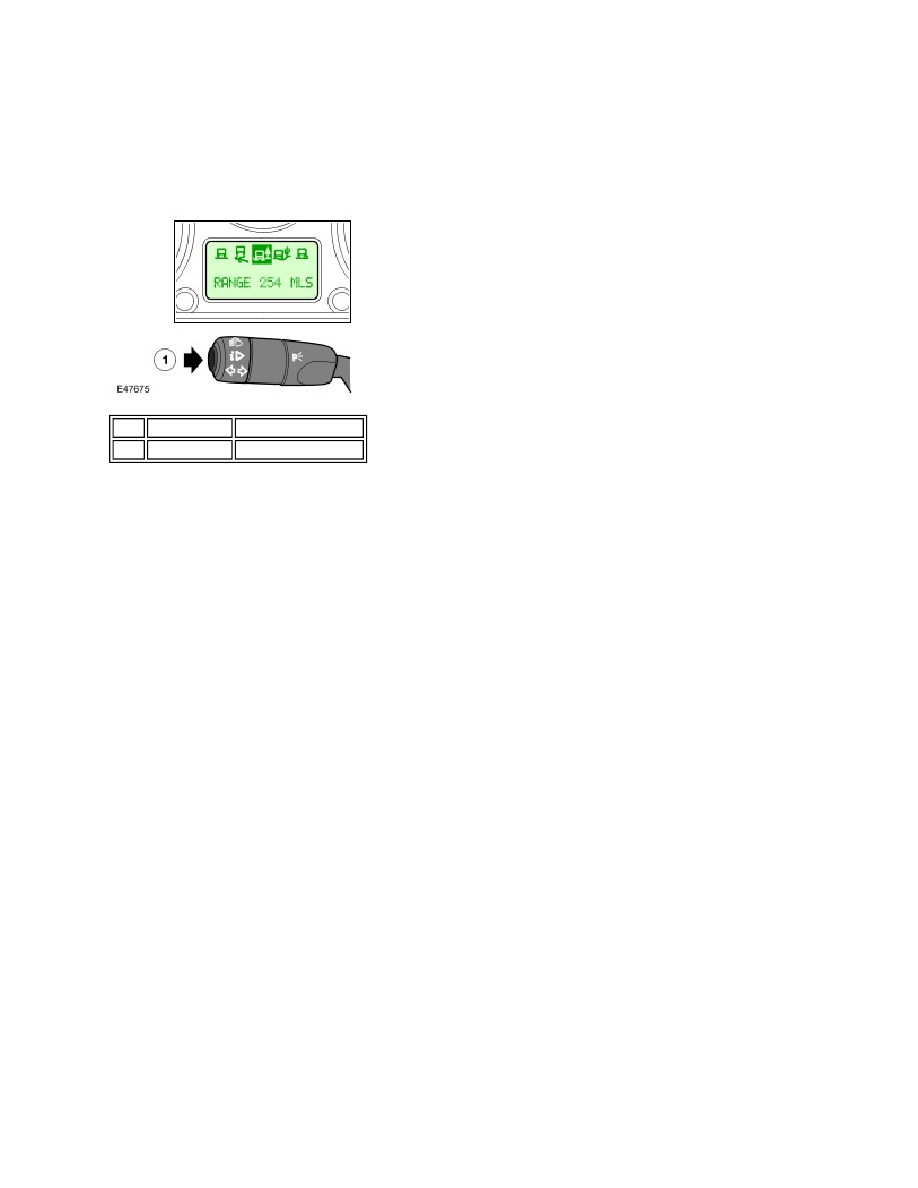
Range The range is displayed showing the distance which can be travelled using the fuel remaining in the fuel 
tank. Pressing the trip computer button for less than 2 seconds will change the display to the next feature. 

The range is displayed showing the distance which can be travelled using the fuel remaining in the fuel 
tank.  
Pressing the trip computer button for less than 2 seconds will change the display to the next feature.  

Average Fuel Consumption The average fuel Consumption is displayed. Pressing the trip computer button for 
more than 2 seconds will reset the average fuel Consumption. The display will show dashes for 3 seconds and 
then change to zeros. Pressing the trip computer button for less than 2 seconds will change the display to the next 
feature. 

The average fuel Consumption is displayed.  
Pressing the trip computer button for more than 2 seconds will reset the average fuel Consumption. The 
display will show dashes for 3 seconds and then change to zeros.  
Pressing the trip computer button for less than 2 seconds will change the display to the next feature.  

Average Speed The average speed is displayed. Pressing the trip computer button for more than 2 seconds will 
reset the average speed. The display will show dashes for 3 seconds and then change to zeros. Pressing the trip 
computer button for less than 2 seconds will change the display to the next feature. 

The average speed is displayed.  
Pressing the trip computer button for more than 2 seconds will reset the average speed. The display will 
show dashes for 3 seconds and then change to zeros.  

Item  Part Number 

Description 

1

 -

Trip computer button

Pinch or Ctrl + scroll to zoom. Double-tap to reset.

Parts & tools for this job Staging For Land Rover Discovery

Links open Amazon search results in a new tab. As an Amazon Associate I earn from qualifying purchases.