
COOLER - ENGINE OIL
- Make
- Land Rover
- Model
- Defender TD5 Defender
- Section
- COOLER - ENGINE OIL
ENGINE
29
REPAIR
VALVE - RELIEF - OIL PRESSURE
Service repair no - 12.60.56
Remove
1. Remove sump gasket. See this Section.
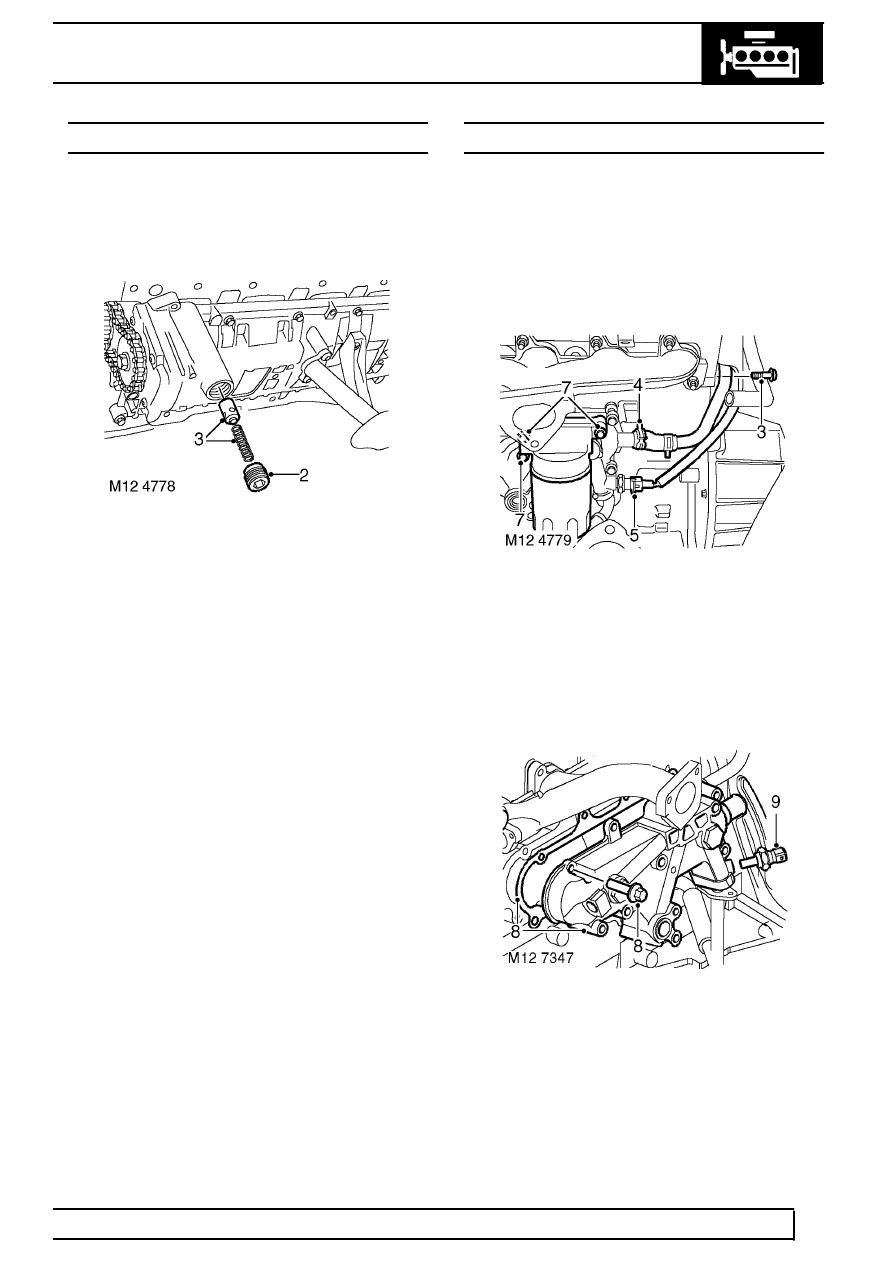
2. Remove and discard oil pressure relief valve
plug from oil pump housing.
3. Remove spring and valve.
Refit
4. Clean valve and spring.
5. Clean valve seating inside oil pump housing.
6. Lubricate valve and seating.
7. Fit valve and spring to pump.
8. Apply Loctite 243 sealant to threads of a new
plug.
9. Fit plug and tighten to 23 Nm ( 17 lbf.ft) .
10. Fit sump gasket. See this Section.
11. Check engine oil level, top-up if necessary.
COOLER - ENGINE OIL
Service repair no - 12.60.68
Remove
1. Drain cooling system. See COOLING
SYSTEM, Adjustment.
2. Remove centrifuge assembly. See this
Section.
3. Remove clutch housing bolt and release coolant
pipe from rear of engine.
4. Release clip and coolant hose from oil cooler.
5. Disconnect oil pressure switch multiplug.
6. Remove oil filter element using a suitable strap
wrench.
7. Remove 3 bolts, remove oil filter adaptor and
discard gasket.
8. Remove 7 bolts, remove oil cooler and discard
gasket.
9. Remove oil pressure switch.
Parts & tools for this job Staging For Land Rover Defender
- PARTEngine gasket setSearch: Land Rover Defender engine gasket set
- TOOLTorque wrenchSearch: 3/8 inch torque wrench
- TOOLFeeler gauge setSearch: feeler gauge set
Links open Amazon search results in a new tab. As an Amazon Associate I earn from qualifying purchases.