
Pedal assembly - r.r.
- Make
- Lancia
- Model
- Thesis Factory Service Manual
- Year
- 2002–2009
- Section
- Hydraulic braking system › Pedal assembly - r.r.
PEDAL ASSEMBLY - R.R.
Removing
See in Op. 4110A10 STEERING WHEEL - R.R. for replacement or checks
See in Op. 7040A26 Steering column TRIM - R.R.
See in Op. 5580C12 CLOCK SPRING for AIR BAG system - R.R.
See in Op. 5550A12 complete stalk unit - r+r for versions with air bag
See in Op. 7040A37 Fuse access cover in instrument panel - R.R.
See in Op. 4110A30 Support with steering control shafts - R.R.
1. Working at the rear of the brake pedal, press the white retaining tabs (1a) securing the brake servo push rod (1c) to the brake pedal (1b).
1. Remove the black retaining device (1a), then release the brake servo push rod (1b) from the brake pedal (1c), keep the brake servo push rod spherical heat housing cover (1d).
After every dismantling operation, the black retaining device (1a) must be replaced even if it appears to be intact.
2. Work on the fastening springs (2a) and release the clutch master cylinder push rod (2b) from the clutch pedal.
See in Op. 1060G38 SWITCH on BRAKE pedal - R.R.
See in Op. 1060G42 CLUTCH pedal SWITCH - R.R.
See in Op. 5580A36 Switch on brake pedal for cruise control - R.R.
See in Op. 5580A38 Switch on clutch pedal for cruise control - R.R.
See in Op. 5580A36 Switch on brake pedal for cruise control - R.R.
See in Op. 5580A38 Switch on clutch pedal for cruise control - R.R.
1. Undo the nuts fixing the pedal assembly to the bodyshell (1a) and to the brake servo (1b).
2. Extract the pedal assembly complete with the brake and clutch pedals.
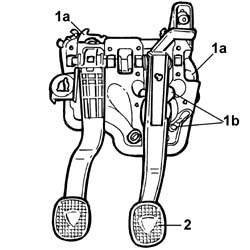
Refitting
- Fit the pedal assembly in the housing and secure it tightening the fixing nuts to the recommended torque.
| Value - daNm | Fastening | Component | Ø | |
|---|---|---|---|---|
| (body) 1.8 | Nuts | PEDALS | M8 |
1. Fit the new retaining device (1a) on the brake pedal (1b) so that the fastening clips (1c) are secured; position the brake servo push rod spherical head housing cover (1d).
After every dismantling operation, the black retaining device (1a) for the brake servo push rod must be replaced even if it appears to be intact.
- Retract the brake servo slightly, lift up the brake pedal and position the brake servo push rod by the retaining device.
- Press the brake pedal to attach the brake servo push rod to the retaining device.
- Fasten the brake servo tightening the fixing nuts to the recommended torque.
| Value - daNm | Fastening | Component | Ø | |
|---|---|---|---|---|
| 1.8 | Nut | BRAKE SERVO | M8 |
See in Op. 5580A36 Switch on brake pedal for cruise control - R.R.
See in Op. 5580A38 Switch on clutch pedal for cruise control - R.R.
See in Op. 5580A36 Switch on brake pedal for cruise control - R.R.
See in Op. 5580A38 Switch on clutch pedal for cruise control - R.R.
See in Op. 1060G38 SWITCH on BRAKE pedal - R.R.
See in Op. 1060G42 CLUTCH pedal SWITCH - R.R.
- Connect the clutch pedal placing it back in the special housing and fully depressing the pedal.
See in Op. 4110A30 Support with steering control shafts - R.R.
See in Op. 7040A37 Fuse access cover in instrument panel - R.R.
See in Op. 5550A12 complete stalk unit - r+r for versions with air bag
See in Op. 5580C12 CLOCK SPRING for AIR BAG system - R.R.
See in Op. 7040A26 Steering column TRIM - R.R.
See in Op. 4110A10 STEERING WHEEL - R.R. for replacement or checks
Removing
- Open the boot, remove the cover on the left hand side and disconnect the negative battery lead.
See in Op. 4110A10 STEERING WHEEL - R.R. for replacement or checks
See in Op. 7040A26 Steering column TRIM - R.R.
See in Op. 5550A12 complete stalk unit - r+r for versions with air bag
See in Op. 7040A37 Fuse access cover in instrument panel - R.R.
See in Op. 4110A30 Support with steering control shafts - R.R.
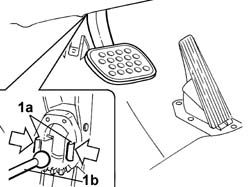
1. Work on the fastening springs (1a) and release the brake servo push rod (1b) from the pedal.
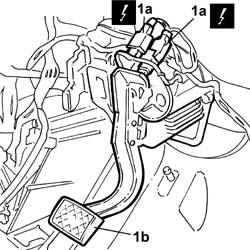
1. Disconnect the electrical connections for the switches (1a) on the brake pedal (1b).
| Description | Connector | |
|---|---|---|
| 1a | Switch on brake pedal | I030 |
| Description | Connector | |
|---|---|---|
| 1b | Switch on brake pedal | I030 |
1. Undo the nuts fixing the pedal assembly to the bodyshell (1a) and to the brake servo (1b).
2. Extract the pedal assembly complete with brake pedal
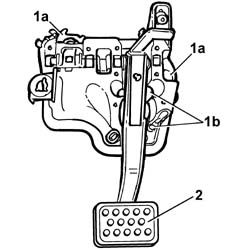
Refitting
- Fit the pedal assembly in the housing and secure it tightening the nuts to the recommended torque.
| Value - daNm | Fastening | Component | Ø | |
|---|---|---|---|---|
| (body) 2 | Nuts | R.R. COMPLETE PEDAL ASSEMBLY | M8 |
- Connect the electrical connections for the switches on the brake pedal.
| Description | Connector | |
|---|---|---|
| Switch on brake pedal | I030 |
| Description | Connector | |
|---|---|---|
| Switch on brake pedal | I030 |
- Connect the brake servo push rod to the pedal applying pressure to fit it.
See in Op. 4110A30 Support with steering control shafts - R.R.
See in Op. 7040A37 Fuse access cover in instrument panel - R.R.
See in Op. 5550A12 complete stalk unit - r+r for versions with air bag
See in Op. 7040A26 Steering column TRIM - R.R.
See in Op. 4110A10 STEERING WHEEL - R.R. for replacement or checks
- Connect the negative battery terminal and position the cover on the left hand side of the luggage compartment.
Parts & tools for this job Staging For 2002 Lancia Thesis
- PARTBrake padsSearch: Lancia Thesis 2002 brake pads
- TOOLBrake bleeder kitSearch: one man brake bleeder kit
- FLUIDBrake fluidSearch: brake fluid
Links open Amazon search results in a new tab. As an Amazon Associate I earn from qualifying purchases.