
Introduction - ACCESSORIES
- Make
- Fiat
- Model
- Multipla Factory Service Manual
- Year
- 1998–2010
- Section
- Accessories › Introduction - ACCESSORIES
Introduction - ACCESSORIES
This function makes it possible to listen to both sides of the tape without turning it over.
Dolby B
This device limits the tape noise and is produced under licence by Dolby Laboratories Licensing Corporation.
MUTE
This function, if activated, for example if there is a telephone fitted in the vehicle, turns the volume down to zero when a call is received or made.
RDS
The RDS (Radio Data System) is a radio telephone information system which uses a special band - 57 kHz for normal FM transmissions.
This function makes it possible to receive various information, such as, for example, traffic news, names of stations, etc.; it also makes it possible to automatically retune a station into the strongest signal transmitting the same programme.
PLL Tuning
Digital tuning with a Phase Lock Loop circuit for the best tuning for radio channels.
The vehicle is prepared for the installation of a radio system.
This preparation comprises:
- radio compartment;
- radio supply cables;
- front loudspeakers located in the doors and separate tweeters, in the front pillars;
- rear loudspeakers, located in the doors;
- connecting cables between radio and loudspeakers;
- aerial;
- aerial coaxial cable.
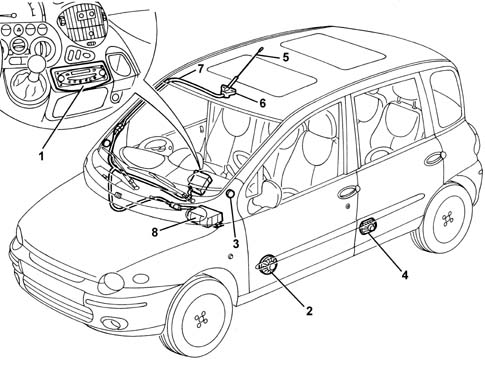
1, Radio
2, Front loudspeaker
3, Front tweeter
4, Rear loudspeaker
5, Aerial
6, Aerial power supply
7, Aerial coaxial cable
8, CD player/changer
RADIO
A radio system is available on request, with fixed-type radio with removable front. The radio is a BLAUPUNKT with RDS decoder, cassette player and CD changer control (if installed)
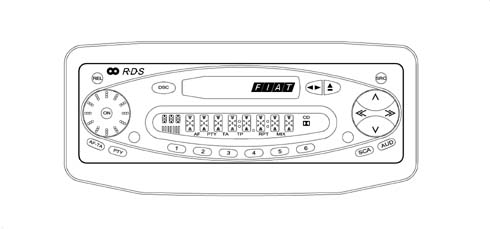
The radio has the following functions:
Amplifier section:
- Operating voltage: 14.4 V
- Nominal output power (RMS): 20W
- Output channels: four
Radio section
- Quartz PLL tuner
- RDS function selector
- Band selector (FM1 FM2 FM3 MFT MW LW);
- Cassette/CD selector;
- Preselected stations scanning
- Preselection / memorization of up to a maximum of 6 stations per band;
- Manual / Automatic tuning
- Manual / Automatic tuning DOWN
- Tuning mode selection (DX LO);
Cassette section;
- Autoreverse;
- Fast forward and fast rewind;
- Automatic search for previous/next track function;
- Repeat last track function;
- Automatically skip empty tracks on tape function;
- Scan tracks on cassette function;
- Dolby B.
Rear connections
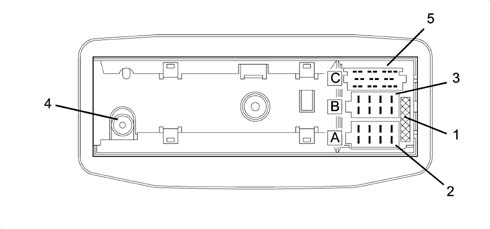
1, Additional fuse
2, Connector A
3, Connector B
4, Aerial coaxial cable connecting socket
5, Connector C: CD connection
Radio pin out
Connector A
Pin, Signal
1, MUTE function
2, N.C.
3, Supply controlled by the ignition
4, Direct supply
5, Aerial supply
6, Lighting
7, Direct supply
8, Earth
Connector B
Pin, Signal
1, Right rear speaker
2, Right rear speaker
3, Right front speaker
4, Right front speaker
5, Left front speaker
6, Left front speaker
7, Left rear speaker
8, Left rear speaker
Connector C
This connector is used for connecting the CD, but also for the 'hands free' microphone for the cellular 'phone:
Pin, Signal
11, 'Hands free' microphone
12, 'Hands free' microphone
Pin, Signal
13, CD / radio change BUS signal
14, Radio / CD change BUS signal
16, Supply
17, Digital earth
18, Audio earth
19, Left audio signal
20, Right audio signal
Cd connection
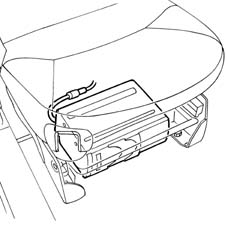
A multipole cable is present - connector C - for connecting a CD player, which can be fitted under the front right seat.
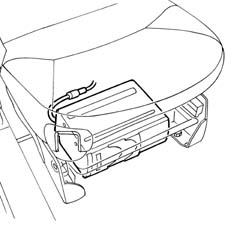
Aerial
The car has an aerial located on the front of the roof, above the windscreen, connected to the radio via a specific coaxial cable.
There is an aerial signal amplifier located on the base of the aerial.
If the wiring is present for the 'hands free' cellular 'phone, the normal aerial is replaced by a 'dual function' aerial with two coaxial cables which run parallel.
Speakers
As standard, the car is prepared for the installation of a radio system complete with loudspeakers. The acoustic system comprises:
- 2 front diffusers Ø 165 mm - power 20 W, located in the doors
- 2 front tweeters, located on the front pillars
- 2 rear elliptical diffusers (130x180 mm) - power 18 W, located in the doors
If the wiring is present for the 'hands free' telephone is present, the front right loudspeaker is specific, of the 'bi-cone' type (used by both the radio and the telephone).
RADIO SYSTEM
The vehicle is equipped with a radio system that includes:
- radio with tape or CD
- radio supply cables
- front loudspeakers and separate tweeters, located in the front pillars
- rear speakers
- connecting cables between radio and loudspeakers
- aerial on roof, controlled by a specific electronic device
- aerial coaxial cable.
- a CD player/changer located under the external passenger seat is also supplied as an option.
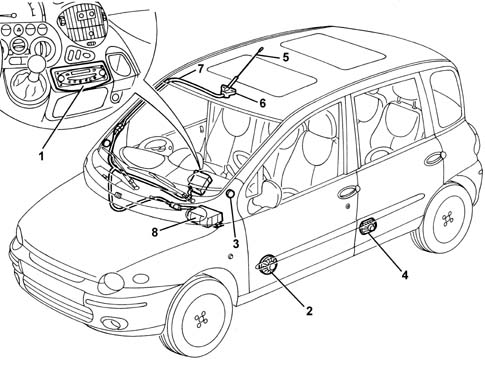
1 - Radio
2 - Front speaker
3 - Front Tweeter
4 - Rear speaker
5 - Aerial in heated rear windscreen
6 - Aerial power source
7 - Aerial coaxial cable
8 - CD player/changer
According to the specifiations, the following are supplied as options:
- Standard CONNECT device
- Radio with NAVIGATOR
- CONNECT device with NAVIGATION SYSTEM ('CONNECT NAV)
These devices are described in Characteristic of working principle 5580N intergrated control system (ics) panel
Radio
This is a BOSCH radio specially customised for the FIAT MULTIPLA
Version with cassette player
The diagram below illustrates the location of the controls on the front section.
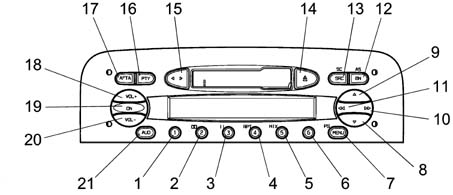
| N. | Symbol | Function F1 | Function F2 | Tuner | Cassette | C.D. Charg. |
|---|---|---|---|---|---|---|
| Press Button<1sec | Press Button>1sec | |||||
| relay | relay | |||||
| relay | relay | T 2 DolbyB on/off | ||||
| 3 | 3 | Recall preset | Recall preset | Recall preset | T3 Pause on/off | |
| 4 | 4 | Programme preset | T4 Repeat on/off | |||
| 5 | 5 | T5 Mix on/off | ||||
| 6 | 6 | |||||
| 7 | MENU | Access to menu | Scan preselection | Access to preselection scan menu | Access menu | Access menu |
| 8 | V | Automatic backwards search | Automatic continuous backwards search | Automatic search | MSS backwards | Previous track selection |
| 9 | ^ | Automatic forward search | Automatic continuous forward search | Automatic search | MSS forward | Next track selection |
| 10 | >> | 1 manual forwards search 2 next PTY prog. 3 fast forward 4 next CD selection | 1 manual forwards search 2 next PTY prog. 3 fast forward 4 next track selection | 1 manual forwards search 2 next PTY prog. | fast forward | Next CD selection |
| 11. | << | 1 manual backwards search 2 previous PTY prog. 3 fast rewind 4 previous CD selection | 1 manual backwards search 2 previous PTY prog. 3 fast rewind 4 start of track | 1 manual backwards search 2 previous PTY prog. | fast rewind | start of previous CD track selection |
| 12. | BN | Radio band selection | Travelstore (FMT) | 1 Sel. bands FM1,FM2,FMT,MW,LW 2 Travelstore (FMT) | Travelstore (FMT) | Travelstore (FMT) |
| 13 | SRC | In order: Tuner, CC, CDC | Source scan | 1 In order: Tuner, CD, CDC 2 FM/AM scan | 1 In order: Tuner, CD, CDC 2 cassette scanning | 1 In order: Tuner, CD, CDC 2 CD scan |
| 14 | eject | Cassette eject | Cassette eject | Cassette eject | Cassette eject | |
| 15 | < > | Autoreverse | Autoreverse | |||
| 16 | PTY | PTY on /off | Display type of programme | 1 PTY on /off 2 Display type of programme | ||
| 17 | AF/TA | TA on /off | AF on/off | 1 TA on /off 2 TA on /off | 1 TA on /off 2 TA on /off | 1 TA on /off 2 TA on /off |
| 18 | VOL+ | Increases the volume by one step | Increases the volume rapidly | 1 Increases volume by one step 2 Increases volume quickly | 1 Increases volume by one step 2 Increases volume quickly | 1 Increases volume by one step 2 Increases volume quickly |
| 19 | ON/OFF | Mute on /off | 1 Radio on 2 Radio off | |||
| 20 | VOL- | Decreases the volume by one step | Decreases the volume rapidly | 1 Decreases the volume by one step 2 Decreases volume quickly | 1 Decreases the volume by one step 2 Decreases volume quickly | 1 Decreases the volume by one step 2 Decreases volume quickly |
| 21 | AUD | Selects: bass, treble, balance, fader | Loudness on/off | 1 Selects: bass, treble, balance, fader 2 Loudness on/off | 1 Selects: bass, treble, balance, fader 2 Loudness on/off | 1 Selects: bass, treble, balance, fader 2 Loudness on/off |
See the 'OWNER'S HANDBOOK for all operating instructions.
Version with cd player
The diagram below illustrates the location of the controls on the front section.
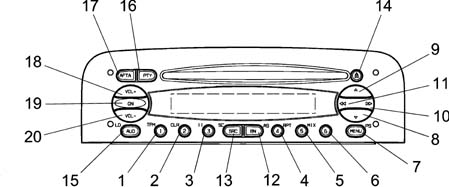
The controls are described below.
| N. | Symbol | Function F1 | Function F2 | Tuner | CD player | C.D. Charg. |
|---|---|---|---|---|---|---|
| Press Button <1sec | Press Button>1sec | |||||
| relay | relay | 1 Preset recall | 1 Preset memorizing | 1 Preset recall | T1 :1TPM on/off 2 stores TPM | |
| relay | relay | 2 TPM on/off | 2 Memorizing/reset TPM | 2 Preset memorizing | T2 reset TPM | T2 reset TPM |
| 3 | 3 | 3 Pause on/off | T3 :Pause on/off | T3 :Pause on/off | ||
| 4 | 4 | 4 Repeat on/off | T4: Repeat on/off | T4: Repeat on/off | ||
| 5 | 5 | 5 Mix on/off | T5: Mix on/off | T5: Mix on/off | ||
| 6 | 6 | |||||
| 7 | MENU | Access to menu | Scan preselection | 1 Access to menu 2 Preselection scan | Access menu | Access menu |
| 8 | V | Automatic backwards search | Automatic continuous backwards search | Automatic search | Previous track selection | Previous track selection |
| 9 | ^ | Automatic forward search | Automatic continuous forward search | Automatic search | Next track selection | Next track selection |
| 10 | >> | 1 manual forwards search 2 next PTY prog. 3 next track selection 4 next CD selection | 1 manual forwards search 2 next PTY prog. 3 next track selection | 1 manual forwards search 2 next PTY prog. | Next track selection | Next CD selection |
| 11. | << | 1 manual backwards search 2 previous PTY prog. 3 start of track 4 previous CD selection | 1 manual backwards search 2 previous PTY prog. 3 start of track | 1 manual backwards search 2 previous PTY prog. | start of track | 1 previous CD selection 2 start of track |
| 12. | BN | Radio band selection | Travelstore (FMT) | 1 Sel. bands FM1,FM2,FMT,MW,LW 2 Travelstore (FMT) | Travelstore (FMT) | Travelstore (FMT) |
| 13 | SRC | In order: Tuner, CD, CDC | Source scan | 1 In order: Tuner, CD, CDC 2 FM/AM scan | 1 In order: Tuner, CD, CDC 2 CD scan | 1 In order: Tuner, CD, CDC 2 CD scan |
| 14 | Eject | CD eject | CD eject | CD eject | CD eject | |
| 15 | AUD | Selects: bass, treble, balance, fader | Loudness on/off | 1 Selects: bass, treble, balance, fader 2 Loudness on/off | 1 Selects: bass, treble, balance, fader 2 Loudness on/off | 1 Selects: bass, treble, balance, fader 2 Loudness on/off |
| 16 | PTY | PTY on /off | Display type of programme | 1 PTY on /off 2 Display type of programme | 1 PTY on /off 2 Display type of programme | 1 PTY on /off 2 Display type of programme |
| 17 | AF/TA | TA on /off | AF on/off | 1 TA on /off 2 TA on /off | 1 TA on /off 2 TA on /off | 1 TA on /off 2 TA on /off |
| 18 | VOL+ | Increases the volume by one step | Increases the volume rapidly | 1 Increases volume by one step 2 Increases volume quickly | 1 Increases volume by one step 2 Increases volume quickly | 1 Increases volume by one step 2 Increases volume quickly |
| 19 | ON/OFF | Mute on /off | 1 Radio on 2 Radio off | |||
| 20 | VOL- | Decreases the volume by one step | Decreases the volume rapidly | 1 Decreases the volume by one step 2 Decreases volume quickly | 1 Decreases the volume by one step 2 Decreases volume quickly | 1 Decreases the volume by one step 2 Decreases volume quickly |
See the 'OWNER'S HANDBOOK for all operating instructions.
Anti-theft function
When the radio is disconnected from the power supply for more than three minutes the protection code, which comes together with the actual radio, must be entered again.
Code insertion procedure
Type of code: 4 figures from '1111' to '6666' (the numbers 0,7,8,9 are not used because the keys are not present!!)
After connecting the radio for the first time, the following appears on the display:
_ _ C O D E _ _ (RDS side)
For 2 secs. and then:
_ _- - - - _ _ (RDS side)
After this, the first digit is selected by selecting the corresponding station (1-6). After this the digits from 2 to 4 are selected in the same way.
If the four digits are not completed within 20 seconds, the word 'CODE will appear again on the display for 2 seconds and then '----'. This type of time out is not considered as having entered the incorrect code.
After entering the fourth digit, the radio will start to play.
If an incorrect code is entered, the radio will produce an acoustic signal; the following information will appear on the display:
_ _ C O D E _ _ (RDS side)
For 2 seconds, and then:
_ _ - - - - _ _ (RDS side)
advising the user to enter another code.
Each time the user enters an invalid code, the waiting time increases (1 min, 2 min, 4 min, 8 min, 16 min, 30 min, 1h, 2h, 4h, 8h, 16h, 24h) until a maximum time of 24h
The waiting time is displayed as follows:
_ _ W A I T_ _ (RDS side)
After this it is possible to start the procedure for entering the code again.
Radio pin out
The diagram below shows the rear view of the radio and the location of the connectors.
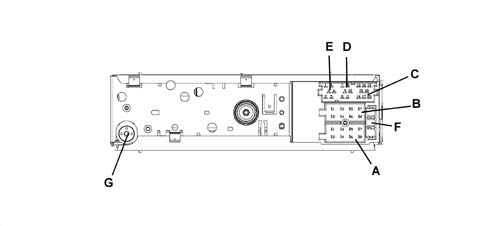
CONNECTOR A
| Pin | Signal |
|---|---|
| A1 | N.C. |
| A2 | MUTE for phone or Bose amplifier Recognition, quando presente |
| A3 | N.C. |
| A4 | Ignition-operated power supply (+15) |
| A5 | 12 V switchable for Aerial |
| A6 | Lit up with side lights on |
| A7 | 18, Direct supply (+30) |
| A8 | Earth |
CONNECTOR B
| Pin | Signal |
|---|---|
| B1 | Right rear speaker + |
| B2 | Right rear speaker - |
| B3 | Right front speaker + |
| B4 | Right front speaker - |
| B5 | Left front speaker + |
| B6 | Left front speaker - |
| B7 | Left rear speaker + |
| B8 | Left rear speaker - |
CONNECTOR C/D/E
| Pin | Signal |
|---|---|
| C1 | NC |
| C2 | NC |
| C3 | NC |
| C4 | NC |
| C5 | NC |
| D6 | Bose amplifier power source, when present |
| D7 | Telephone for speakers in + |
| D8 | Telephone for speakers in - |
| D9 | Telephone mute |
| D10 | Signal A controls on steering wheel |
| D11 | Signal B controls on steering wheel |
| D12 | Earths and mute controls on steering wheel |
| E13 | ASCI-BUS in (for CDC) |
| E14 | ASCI-BUS out (for CDC) |
| E15 | N.C. |
| E16 | 12V switched (for CDC) |
| E17 | ASCI -BUS Earth (for CDC) |
| E18 | NF - Earth input (for CDC) |
| E19 | Input L (for CDC) |
| E20 | Input R (for CDC) |
CONNECTOR G
Aerial
F: Fuse 10 A
Cd connection
A multipole cable is present - connector C - for connecting a CD player, which can be fitted under the front right seat.
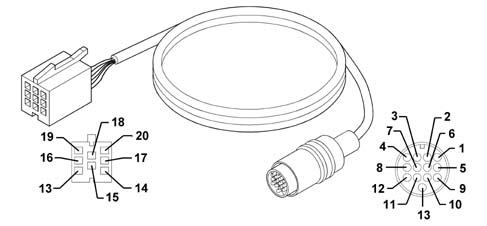
Cd changer lead
Connector, radio side:
| PIN | SIGNAL |
|---|---|
| 13 | ASCI bus CDC - radio |
| 14 | ASCI bus radio - CDC |
| 15 | Permanent power source (N.C.) |
| 16 | Switched power supply |
| 17 | digital earth |
| 18 | audio earth |
| 19 | CDC left audio |
| 20 | CDC right audio |
Rapid attachment multipolar connector, CDC side:
| Pin | Signal |
|---|---|
| relay | digital earth |
| 3 | Permanent power supply |
| 4 | Switched power supply |
| 6 | audio earth |
| 8 | CDC right audio |
| 10 | ASCI bus CDC - radio |
| 12. | digital earth |
| 12. | CDC left audio |
| 13 | ASCI bus radio - CDC |
RADIO CONTROLS ON THE STEERING WHEEL (IF FITTED)
View of electrical controls on the steering wheel.
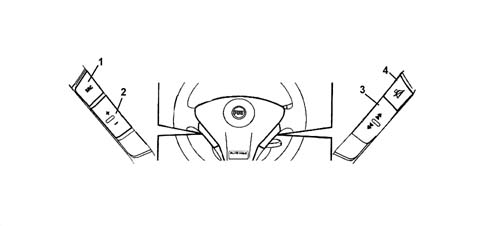
1 - SOURCE command
2 - Volume + / - command
3 - Scan + / - command
4 - Mute command
Aerial
The car has an aerial located on the front of the roof, above the windscreen, connected to the radio via a specific coaxial cable.
There is an aerial signal amplifier located on the base of the aerial.
The aerial is dual function type with two coaxial cables which run in parallel. One is for the radio signal and the other for the GSM signal, see Characteristic of working principle 5580N intergrated control system (ics) panel.
Loudspeakers
As standard, the car is prepared for the installation of a radio system complete with loudspeakers. The acoustic system comprises:
- 2 front speakers located on the front pillars;
- 2 front tweeters, located on the front pillars
- 2 rear elliptical diffusers (130x180 mm) - power 18 W, located in the doors
Parts & tools for this job Staging For 1998 Fiat Multipla
- TOOLDigital multimeterSearch: automotive digital multimeter
- PARTAssorted fuse kitSearch: car fuse assortment kit
- TOOLWire crimper and connector kitSearch: wire crimper connector kit
Links open Amazon search results in a new tab. As an Amazon Associate I earn from qualifying purchases.