
Brake light switch - r+r
- Make
- Alfa Romeo
- Model
- Brera and Spider Factory Service Manual
- Year
- 2005–2010
- Section
- Warning and manoeuvring indicators › Brake light switch - r+r
Electrical equipmentBrake light switch - r+r
BRAKE LIGHT SWITCH - R+R
Removing
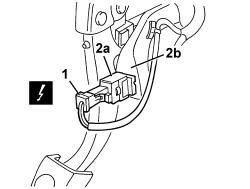
1. Disconnect the electrical connection.
| Description | Component |
|---|---|
| BRAKE PEDAL SWITCH | See I030 BRAKE PEDAL SWITCH |
2. Rotate the switch on the brake pedal (2a) through about 90° in an anti-clockwise and extract it from the mounting (2b).
Refitting
- Check that the switch is not damaged.
- Gently lower the brake pedal and fit the switch in place, then rotate it through about 90° in a clockwise direction until it is locked.
- Check that the brake lights are working.
Parts & tools for this job Staging For 2005 Alfa Romeo Brera
- TOOLOBD2 scannerSearch: OBD2 scanner
- TOOLDigital multimeterSearch: automotive digital multimeter
- TOOLBack-probe test leadsSearch: back probe test leads
Links open Amazon search results in a new tab. As an Amazon Associate I earn from qualifying purchases.