
R.r. centre pillar
- Make
- Alfa Romeo
- Model
- Brera and Spider Factory Service Manual
- Year
- 2005–2010
- Section
- Removing-refitting › R.r. centre pillar
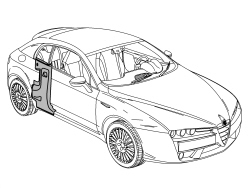
R.R. CENTRE PILLAR
Removing
- Check that the components connected are not distorted by checking the bodyshell alignment measurements using suitable equipment (gauges, templates or jigs).
- Straighten the body as necessary.
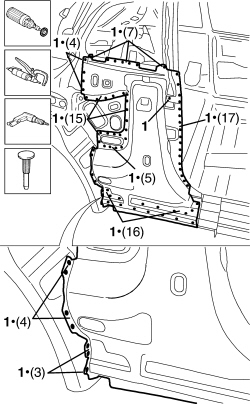
- Use a rotary brush to remove the paint and gain access to the spot welds.
1. Use the chamfering machine to remove the spot welds shown in the diagram.
- Use the drill to chamfer the spot welds that aren''t accessible to the chamfering machine.
- Use a hammer and chisel to remove the previously chamfered spot welds.
- Remove the part from the vehicle.
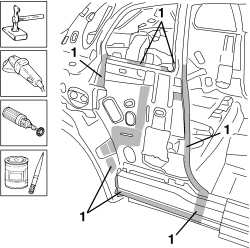
- Straighten the edges of the vehicle using a hammer and dolly block.
- Remove the spot weld residues using a disc grinder.
- Use a rotary brush to clean the previously treated areas.
1. Apply electro-galvanizing paint.
Refitting
1. Remove the anti-corrosion treatment from the entire perimeter of the inside and outside of the replacement part using a rotary brush.
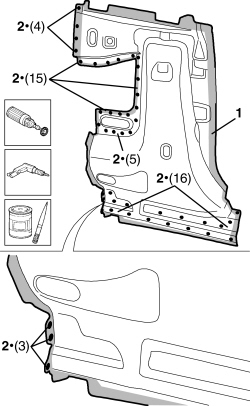
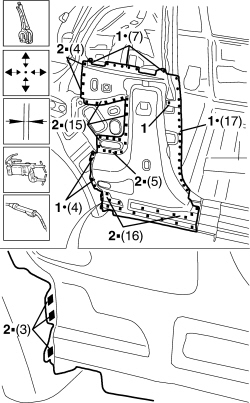
2. Drill out the part at the indicated points.
- Apply electro-weldable paint to the edges involved.
- Position the replacement part correctly on the vehicle and secure it using self-locking clamps.
- Check the alignment and the surrounding gaps.
1. Use a spot welder to weld the areas shown in the diagram.
2. Use a MIG welder to fill weld the openings made previously.
- Correct any distortions to the panel using a mallet and dolly block.
1. Use a disc grinder to level the welds.
- Use a rotary brush to clean the previously welded areas.
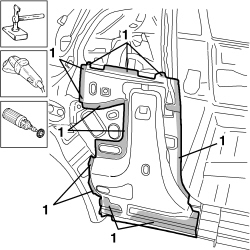
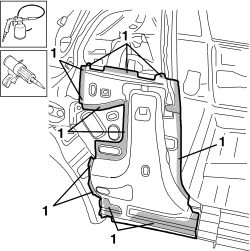
1. Apply anti-oxidant protection to the areas involved in the welding.
- Seal the join lines between the replacement part and the vehicle.
Parts & tools for this job Staging For 2005 Alfa Romeo Brera
- TOOLTrim removal tool kitSearch: trim removal tool kit
- PARTTouch-up paintSearch: Alfa Romeo touch up paint
- PARTPanel clip assortmentSearch: Alfa Romeo panel clips assortment
Links open Amazon search results in a new tab. As an Amazon Associate I earn from qualifying purchases.