
Brake pedal switch - r r
- Make
- Alfa Romeo
- Model
- GT Factory Service Manual
- Year
- 2003–2010
- Section
- Diesel injection system › Brake pedal switch - r r
EngineBrake pedal switch - r r
BRAKE PEDAL SWITCH - R R
Removing
Ensure that the ignition key is in the OFF position, then disconnect the negative battery terminal (-).
| Name | Connector | |
|---|---|---|
| Battery | See A1B BATTERY ( BATTERY NEGATIVE ) |
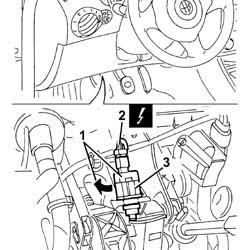
1. Turn the switch on the brake pedal clockwise through 90 degrees and remove it.
2. Disconnect the electrical connection from the switch on the brake pedal.
| Name | Connector | |
|---|---|---|
| 2 | Brake pedal switch | See I30 BRAKE PEDAL SWITCH ( FRONT ) |
3. Remove the brake pedal switch.
Refitting
1. Press the brake pedal, then refit the brake pedal switch and turn through 90 degrees anticlockwise until it clicks home.
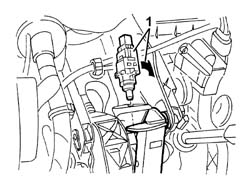
Release the brake pedal.
Connect the electrical connection to the switch on the brake pedal.
Connect the negative (-) battery terminal
Check the operation of the brake lights.
Parts & tools for this job Staging For 2003 Alfa Romeo GT
- TOOLOBD2 scannerSearch: OBD2 scanner
- TOOLDigital multimeterSearch: automotive digital multimeter
- TOOLBack-probe test leadsSearch: back probe test leads
Links open Amazon search results in a new tab. As an Amazon Associate I earn from qualifying purchases.