
Panel with multifunction display and headlamp alignment switches buttons r r
- Make
- Alfa Romeo
- Model
- GT Factory Service Manual
- Year
- 2003–2010
- Section
- Instruments › Panel with multifunction display and headlamp alignment switches buttons r r
Electrical equipmentPanel with multifunction display and headlamp alignment switches buttons r r
PANEL WITH MULTIFUNCTION DISPLAY AND HEADLAMP ALIGNMENT SWITCHES BUTTONS R R
Removing
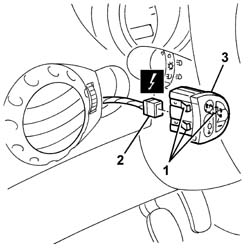
1. Release the retainers for the switch panel from the dashboard trim.
2. Disconnect the electrical connection.
| Name | Connector | |
|---|---|---|
| 2 | Controls for headlamp alignment instrument lighting adjustment | See H10 CONTROLS FOR HEADLAMP ALIGNMENT INSTRUMENT LIGHTING ADJUSTMENT ( FACIA ) |
3. Recover the switch panel.
Refitting
Check that the switch unit is undamaged.
Connect the electrical connection.
Fit the switch panel in the dashboard trim.
Check the devices are working properly.
Parts & tools for this job Staging For 2003 Alfa Romeo GT
- TOOLTie rod end toolSearch: tie rod end puller
- TOOLBall joint separatorSearch: ball joint separator
- FLUIDPower steering fluidSearch: Alfa Romeo power steering fluid
Links open Amazon search results in a new tab. As an Amazon Associate I earn from qualifying purchases.