
Analogue control panel
- Make
- Alfa Romeo
- Model
- GT Factory Service Manual
- Year
- 2003–2010
- Section
- Instruments › Analogue control panel
ANALOGUE CONTROL PANEL
SPECIFICATIONS
INTRODUCTION
The instrument panel is inside the B-CAN and is called the NQS (Instrument Panel Node).
The signals concerned with systems on the C-CAN are made available to the NQS by the Body Computer Node via an interface known as a Gateway.
The task of the NQS is to display the vehicle operating parameters and to notify the driver of any possible faults in the on-board electronic systems.
The instrument panel includes a TN LCD display and a reconfigurable DSTN dot-matrix display (HIGH version).
Some specifications are fitted with a LOW version with two TN LCD displays.
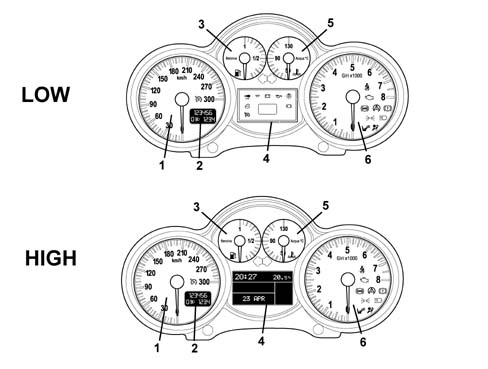
1 - Speed indicator
2 - LCD display (odometer, headlamp alignment corrector)
3 - Fuel level gauge
4 - Reconfigurable dot matrix LCD display (clock, outdoor temperature, operation warning lights etc.) (HIGH version)
4 - LCD display (operation warning lights) (LOW version)
5 - Coolant temperature gauge
6 - Rpm indicator
7 - Operation warning lights
The rear view is illustrated below.
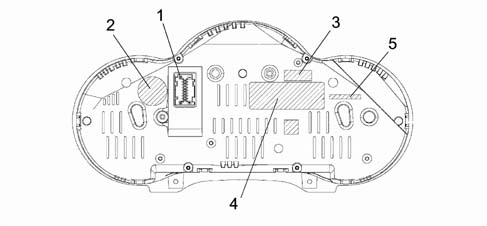
1 - 18 pin connector (2 x 9 pin)
2 - Fiat Auto S.p.A. logo
3 - Supplier''s logo (VDO)
4 - Supplier''s management logo (shows Fiat part number, VDO part number and VDO bar code)
5 - Labelling for recycling
PIN OUT
The following figure shows the PINOUT.
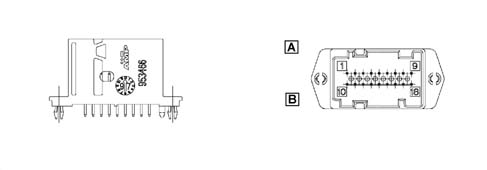
connector A (pins 1-9):
1 - ignition-operated INT. +15 from fuse F37
2 - +30 power supply from fuse F53
3 - B-CAN H
4 - B-CAN L
5 - Headlamp alignment corrector actuator signal reference
6 - Low beam positive from fuse F13 for headlamp alignment control
7 - Earth
8 - Negative signal from trip computer key on steering wheel stalk unit
9 - Signal from controls (zero km, mode -)
connector B (pins 10-18):
10 - EOBD warning light negative signal from N.C.M.
11 - Signal from controls (headlamp alignment corrector up, headlamp alignment corrector down)
12 - Inertia switch cut-in signal (NA)
13 - AIR BAG failure warning light negative signal
14 - Passenger Air Bag disabled warning light negative signal
15 - Driver''s seat belt not fastened warning light negative signal
16 - Signal from controls (MODE MODE +)
17 - Engine oil level sensor supply (only for JTD);
17 - Engine oil temperature sensor signal (only for 3.2 V6)
18 - Engine oil level sensor signal (only for JTD);
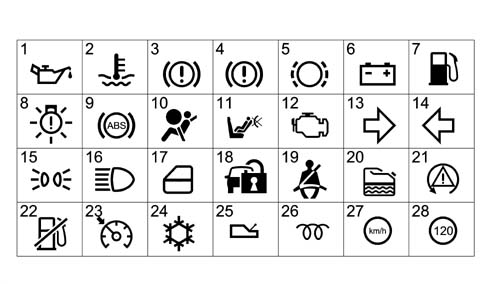
TABLE SHOWING WARNING LIGHTS AND LOCATION ON NQS
| Description | Colour | Symbol (see figure) | Display vers. HIGH | Display vers. LOW | Side light |
|---|---|---|---|---|---|
| Oil pressure | red | 1 | + message symbol on the matrix display | LED | Central quadrant |
| Engine coolant temperature | red | 2 | KED and + message symbol on the matrix display | LED | Engine coolant temperature dial |
| Hanbrake applied | red | 3 | KED and + message symbol on the matrix display | LED | Rev counter dial |
Brake circuit failure: - Insufficient brake fluid - EBD fault (with ABS active) | red | 4 | KED and + message symbol on the matrix display | ||
| Brake pad wear | red | 5 | + message symbol on the matrix display | LED | Central quadrant |
| Alternator failure | red | 6 | + message symbol on the matrix display | LED | central dial |
| Fuel reserve | amber | 7 | LED | LED | fuel level dial |
| Exterior lighting failure | amber | 8 | message on the matrix display | LED | central dial |
| ABS failure | amber | 9 | KED and + message symbol on the matrix display | LED | rev counter dial |
| AIR BAG failure | red | 10 | LED | LED | rev counter dial |
| Passenger AIR BAG deactivated | amber | 11 | LED | LED | rev counter dial |
| EOBD (engine management system failure) | amber | 12 | KED and + message symbol on the matrix display | LED | rev counter dial |
| RH turn signal | green | 13 | LED | LED | central dial |
| LH turn signal | green | 14 | LED | LED | central dial |
| Side lights | green | 15 | LED | LED | rev counter dial |
| Main beam headlight | blue | 16 | LED | LED | rev counter dial |
| Door/s open | red | 17 | + message symbol on the matrix display | LED | central dial |
| Immobilizer (CODE) | amber | 18 | + message symbol on the matrix display | LED | central dial |
| Seat belt | red | 19 | LED | LED | central dial |
| Water in diesel filter sensor | amber | 20 | + message symbol on the matrix display | DOT matrix | |
| ASR / VDC | amber | 21 | KED and + message symbol on the matrix display | LED | rev counter dial |
| Inertia switch on | amber | 22 | + message symbol on the matrix display | LED | DOT matrix |
| Cruise Control | green | 23 | + message symbol on the matrix display | LED | Central quadrant |
| Danger - Ice signal | amber | 24 | + message symbol on the matrix display | Outdoor temperature flashing | DOT matrix |
| Selespeed failure | red | 25 | + message symbol on the matrix display | DOT matrix | |
| Heater plugs | amber | 26 | + message symbol on the matrix display | LED | Central quadrant |
| Speed limit warning | red | 27 | + message symbol on the matrix display | DOT matrix | |
| Speed threshold warning (only certain markets) | red | 28 | message on the matrix display | DOT matrix |
The symbols shown in the active matrix display appear in a window about 32 x 32 pixels in the lower part of the matrix in the centre; this section can be lit up in 3 different colours (red, amber or green).
Information table on display
| LOW version | HIGH version | |
| TN LCD DISPLAY (1) | Odometer Headlamp alignment corector Engine oil level (JTD) Lighting dimmer | odometer headlamp alignment corrector |
| DISPLAY (2) LCD LCD TN (LOW) DISPLAY (2) LCD DOT – DSTN (HIGH) | Clock Outdoor temperature Inertia switch Buzzer volume adjustment | Faults (symbol + message) Clock Date Outside temperature Engine oil temperature (3.2V6) Trip Computer Radio Info/Telephone/Navigation System Set-up menu Service Engine oil level (JTD) Lighting dimmer Robotised Gearbox info |
Diagnosis
The diagnosis of the instrument panel can be carried out using the diagnostic equipment available in the network (Examiner or Examiner plus).
The diagnostic socket is located in the EOBD, the line used is the B-CAN line.
The following operations are included in the diagnosis:
- Display of possible errors present in the instrument panel,
- Memorizing milometer mileage.
- Set kilometres for the SERVICE function (instrument panel replacement)
- Carry out the active diagnosis in order to check the operation of the instrument panel
When the panel is replaced the alignment of the PROXI should always be carried out (using the specific program); if it is not, then the mileometer will flash and the panel will not be fully operational.
OPERATION
The task of the instrument panel node is to:
- Receive and transmit information on the B-CAN
- Manage the accessory functions.
- Receive and manage signals not from network
- Display the vehicle operating statuses
The diagram below illustrates the main Instrument Panel Node connections
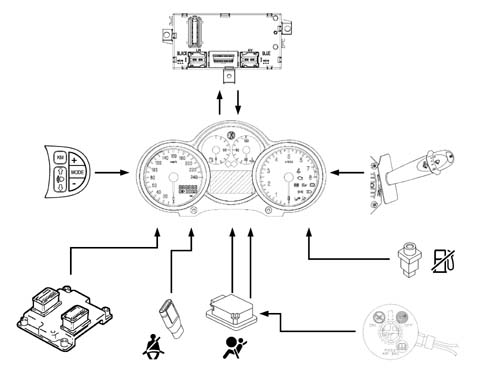
The functions involving the Instrument Panel Node are listed below:
SPEEDOMETER
The instrument panel receives speed information, expressed in km/h, via the B-CAN line and then displays it by means of a pointer which is moved by a step motor.
The speed information comes from the NBC and the latter calculates the speed using the wheel rpm signal from the NFR (ABS) and measurement of the wheel circumference memorized in the NBC
The pointer remains stationary, in the rest position, at speeds of between 0 and 4 km/h. The speed signal received is shown at higher speeds.
Error conditions
In case of error, the speedometer pointer will position itself on the zero speed notch (rest position) and remain in this position for as long as the fault persists.
Speed limit (only high version)
It is possible set a speed limit from the Menu, with a range from 30 to 250 km/h
Limit selection is closed loop (not rolling: reach limit and go back). When the selection has been made and the function is active, if vehicle speed exceeds the preset limit of +1 km/h, the matrix display shows a + symbol warning message and an acoustic signal is activated (Alarm beep 1).
The alarm signal remains active (message up to 20s, afterwards only the symbol) as long as the speed is lower than 5 km/h below the alarm activation speed.
EXAMPLE
If a limit of 170 km/h is selected, the signal (message + symbol + alarm beep) is activated at speeds equal to 171 km/h and deactivated at vehicle speeds equal to 166 km/h.
ODOMETER
The display contains 7 segments and is configured as a quasi dot matrix to obtain a dot matrix-like configuration.
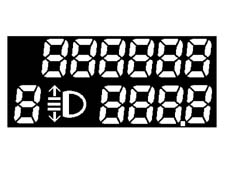
The panel receives information, from the B-CAN line, on the distance travelled processed by the NBC using information coming from the NFR and it increases the total milometer and trip meter counters.
The km travelled are shown on an LCD display (1) that shows headlamp alignment adjustment information.
The display lighting is green and there is an SMD LED.
The LCD has 6 digits (with 7 segments for each digit) for the total reading and 4 digits plus a decimal point for the trip reading. Insignificant zeros are not displayed in order to reduce the numbers shown to the important ones only.
When the "0 km" key is pressed (outside the NQS) for longer than 1s < t < 3 s the partial odometer is reset, but not the total odometer, the distance travelled (Trip) or the Service mileage.
The instrument memorizes the total mileage so that if the battery is disconnected (+30) not more than +/1 km is lost whilst the trip meter memory is lost altogether.
When the instrument with LCD odometer is delivered to the assembly factory the milometer can only be zeroed once within the first 200 km (or 125 miles).
The possibility of carrying out this zeroing is indicated on the LCD by the letter "H" at the first digit (with 7 segments) on the left of the milometer.
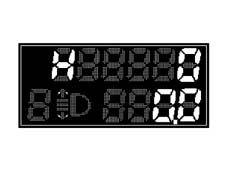
If the above operation is carried out before reaching 200 km, the total odometer resets to zero (the partial odometer reesets, the trip counter resets and the Service mileage resets) by pressing the "0 km" key for time t > 10 s and the letter H disappears.
If this operation is not carried out, when 200 km is reached/exceeded, the letter H disappears and the mileage is displayed with no possiblity of zeroing the milometer any more.
The instrument allows the programming of the total number of km (if it is replaced) on condition that the figure entered is higher than the last value memorized
When the maximum mileage is reached on the milometer (699999 km - 399999 miles), it is not zeroed but horizontal bars/dashes are displayed. When the trip meter reaches 999.9 Km, it returns to 0.0
Behaviour of mileometer with the key out
With the ignition switched off, nothing is shown on the display; in this case the "0km" key has no function, when one of the front doors (left/right) is opened/closed the milometer will light up and display the trip meter and total mileage information for a certain time.
Error conditions
In case of error, the odometer displays the last valid value until it receives a new valid value.
REV COUNTER
The panel receives rpm information supplied to the network by the NCM via the B-CAN line and displays it by means of a pointer moved by a step motor.
The panel processes the engine rpm data without corrections applying a time constant of 200 ms so that the response to the zero RPM - full scale defection RPM step is less than 2 seconds
Pointer position at key-off
At key-off, the pointer is set to 0 (0 rpm).
Examples of errors
In case of error, the pointer sets itself to ZERO (beginning of scale) until the error status disappears.
Alarm signals
If the pointer reaches the red danger area, if partial panel lighting has been set, it is adjusted to the required level using the dimmer.
Engine coolant temperature gauge
The temperature reading allows values between +50 and +130 to be displayed
The panel receives engine temperature information, via the B-CAN line, made available by the NCM, which varies between an actual temperature range of -40 to +215 °C (the range displayed is from +50 to +130) and the NQS displays the temperature by means of a pointer moved by a stepping motor. Pointer movements are uniform.
Gauge/warning light behaviour at the key-on
Ton = Temperature reading at key-on.
Toff = Temperature reading corresponding to the gauge position at the key-off (which usually corresponds to the actual temperature reading at the key-off). If what is defined in condition "d" takes place (burst of heat: 2 mins inhibition) the temperature reading corresponding to the position of the gauge is different from the actual temperature of the engine coolant.
The temperature reading is always guaranteed even in electrical operating limit conditions (9/16V).
If the operating voltage is not stable then the frequency acquisition for the temperature signal allows a correct reading on the panel.
Operating logic for the engine coolant temperature gauge at the key-on.
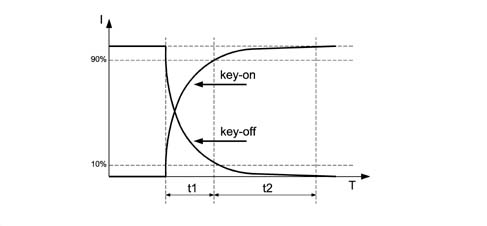
I = Gauge position
T = Time (s)
t1 = 1.5 s + 0.5 / -0
t2 = 3s
t1+t2 = 5s max.
Pointer behaviour at key-off:
Under conditions of key-off, the pointer moves to the zero notch.
Temperature warning light and indicator operating logic
Operating logic for engine coolant temperature gauge in normal operating conditions
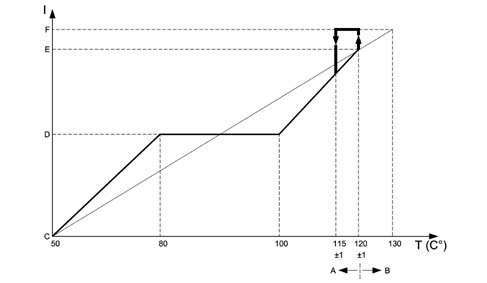
I = Scale reading
T = Temperature
A - Gauge operation by instrument panel
B - Warning light operation by c.c.m.
C - Start of scale
D - Centre of scale
E - Start of red sector
F - End of scale
For temperatures of T = 50 °C, the pointer should be at the first reference on the scale (start of scale).
For temperatures between 50 ÷ 80 °C the pointer should increase in a linear fashion.
For temperatures between 80 ÷ 100 °C (normal operation), the pointer should remain in a stable position in the centre of the scale.
For temperatures between 100 ÷ 120 °C (uphill) and between 115 ÷ 100 °C (downhill) the pointer should move in a linear fashion.
For temperatures of T = 120 ± 1 °C, the pointer should be located at the beginning of the red sector of the scale.
For temperatures of T = 122 °C the pointer should reach the position corresponding to the beginning of the red sector and, as soon as the engine management control unit sends the warning light on signal, it should be positioned at the end of the scale (t = 1 s); the engine coolant temperature overheating warning light should come on at the same time.
In addition:
- if the warning light on signal coming from the c.c.m. remains in the ON state, the pointer should remain at the end of the scale and the warning light should remain on;
- if the c.c.m sends the warning light off signal (when the temperature goes below the level usually equal to T = 115 ± 1°C), the instrument panel should instantly switch the coolant overheating warning light off and the pointer should place itself (t = 1 s) in the position corresponding to the (actual) temperature value measured.
There is a hysteresis of 5 °C, in other words, for example, the warning light is switched on at 120°C, it is switched off at 115 °C.
Engine coolant overheating warning light
The panel receives the information that the warning light is switched on/off via the B-CAN line.
The software strategy that regulates the switching on/off of the engine coolant overheating warning light and the operation of the pointer in the end of scale position when the temperature levels/limits are reached, both in normal operation and if there is a burst of heat, is contained inside the engine management control unit.
Error conditions/diagnosis
The instrument panel warning light is activated at each key-on (check stage); after 4 secs. the CCM/NCM sends the panel the command to switch the warning light off. During this check stage the behaviour of the gauge should be as defined in the previous paragraph ("gauge behaviour at key-on"). Through the effect of the warning light coming on, the pointer is not in the end of scale position during the check stage.
If the warning light on conditions were present at the key-on (engine coolant temperature overheating and warning light already on at the previous key-off), the c.c.m. keeps the command to switch the warning light on activated and the instrument panel continues to keep the warning light in an ON state and places the pointer in the end of scale position.
DIAGNOSIS OF CONNECTING LINE WITH TEMPERATURE SENSOR
The system checks for the presence of irregular system conditions. Therefore if there is a faulty connection between the temperature sensor and the NCM, the latter commands the "injection/EOBD failure" warning light in the NQS to come on.
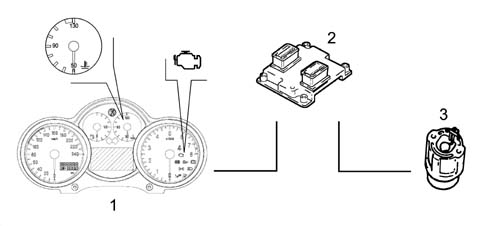
1 - Instrument panel
2 - Engine Management Node
3 - Sensor
If there is a fault, the engine coolant temperature gauge pointer should be on the zero reference (rest position) and should remain in that position as long as the fault persists.
FUEL LEVEL GAUGE
The fuel level gauge makes it possible to display fuel figures as a percentage.
The instrument panel receives information, via the B-CAN line, about the fuel level of the tank capacity expressed in % points calculated by the NBC and this information is then represented by a pointer moved by a stepping motor.
Graph showning information received from the nbc
Actual fuel level in litres/reading on gauge characteristic
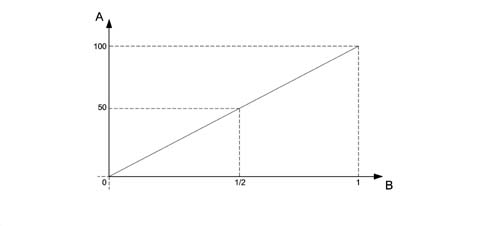
A - % fill
B - Reading on NQS
Pointer behaviour at key-on:
At key-on, the pointer shows the fuel level as communicated by the NBC. It moves to the position in accordance with the strategy shown in the graph below. After a period of approximately 5 s, under normal service conditions (vehicle running), the NBC sets a damped operating mode to prevent reading errors due to the fuel slopping about in th tank.
Fuel level gauge operating logic at key-on, key-off and key-off.
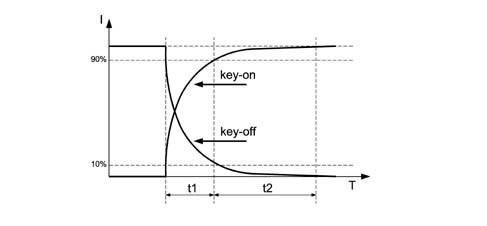
I = Gauge position
T = Time
t1 = 1.5s + 0.5 / -0
t2 = 3s
t1 + t2 = 5 s max
Pointer behaviour at key-off:
During key-off, the pointer moves to the zero notch (first notch) in acordance with the strategy shown in the graph
DIGITAL FUEL RESERVE WARNING LIGHT
The NQS receives an on/off signal from the reserve warning light via the B-CAN network from the NBC
Diagnosis
The system checks for the presence of irregular system conditions. If the NQS receives an error message via the B-CAN network, it positions the pointer at the start of the scale (rest area/key-off) and the warning light flashes at a frequency of 1 Hz. DC 50%
The warning light also flashes if:
- the Body Computer is disconnected from the B-CAN line more than 4s after key on.
- the control panel node is disconnected from the B-CAN line.
Indicator recovery logic (step motor)
If the indicator stepping motors are losing steps, due, for example, to: transportation/movement, installation of the panel on the vehicle or as a result of serious mechanical and electro-magnetic stresses that have occurred whilst the vehicle was being driven on the road or whilst it was stationary.
There is a "return to zero" logic for all the gauges (partial or complete recovery) at each key-on and key-off operation
This logic also provides for the "return to zero" of all the gauges (complete recovery) each time the battery is connected (+BATT.)
When the gauges are in the "normal operating" positions, this logic guarantees that any movements/fluctuations of the gauges are not visible to the user.
ENGINE OIL LEVEL gauge (only for JTD engine)
The engine oil level gauge function indicates engine oil level at start-up on the instrument display.
The gauge is equipped with a special circuit that controls a hot wire oil level sensor.
The information is displayed: on the display (odometer) on the LOW version, on the reconfigurable matrix display on the HIGH version.
Display of the signal
LOW VERSION
At key on, the message OIL is displayed on the lower part of the odometer for 10 seconds. Six digital squares on the upper part of the display gradually light up to show the amount of oil present in the engine. With al the squares lit, the oil level is at maximum.
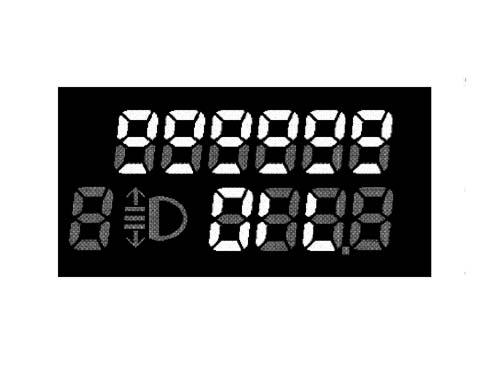
As the oil level drops, the squares in the upper part gradually go out.
When the oil level is at minimum, the squares in the upper part are all out and the underlying dashes flash at a rate of 0.5 Hz.
If the oil level is higher than a critical value, above the maximum level, the message “HIGH OIL” is displayed for 10 seconds.
If a break or short-circuit is present in the indicator circuit at key-on, the word OIL flashes for 10 second at a rate of 0.5 Hz and the dashes disappear.
HIGH VERSION
At key on, the message engine oil level is displayed for 10 seconds. The amount of oil present in the engine is displayed by turning six bars on/off. The maximum oil level is represented by all the bars lit.
If the oil level is lower than the minimum specified level, the bars are all off and the message "minimum oil level" is displayed for 10 seconds. The bars are also all empty and the low oil level symbol appears in the warning light area.
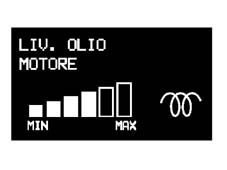
If the oil level is above the maximum specified level, the bars will all be lit up and the "maximum oil level" message will be displayed for 10 secs.
If a fault is detected in the oil level sensor, the "oil level sensor fault" message will be displayed for 10 seconds.
Signal acquisition
The vehicle must be level for accurate signal acquisition. The barycentric position of the sensor nevertheless compensates for minor tilting of the vehicle.
The counter is zeroed the first time the battery is connected.
At the first key on, the oil level is ready (reading time equal to 1 second) and the result is shown on the display.
Afte reading, the counter is set to 20 minutes. During the key on period, the counter decreases by one unit per minute to a minimum value of 2 minutes.
At the next key off, the counter decreases from two down to zero.
At the next key on, and only if the counter is equal to zero, the system reads and stores the new value.
If the counter is still >0 at key on, it is compared with the previous reading and if:
- the current reading is greater than or equal to the previous reading by 3 segments, measurement display notches, the reading is downloaded, stored and the counter is reset to 20 and the countdown starts again as before;
- the current reading is less than 3 segments, measurement display notches, the reading is not stored and the level status corresponding to the last effective reading is displayed. The counter resets itself to 20 and begins the countdown again.
Engine OIL TEMPERATURE GAUGE (only for 3.2 V6)
The function displays the oil temperature, directly acquired from the guage by means of a sensor, and also displays an excessive temperature warning on the display.
The information is shown on the reconfigurable matrix display
The engine oil temperature is downloaded by means of an analogue input and then displayed on a bar chart:
- 0 Bars: Temperature between -40ºC and 60ºC
- 1 Bar: Temperature between 60ºC and 80ºC
- 2 Bars: Temperature between 80ºC and 100ºC
- 3 Bars: Temperature between 100ºC and 120ºC
- 4 Bars: Temperature between 120ºC and 140ºC
- 5 Bars: Temperature greater than 140ºC
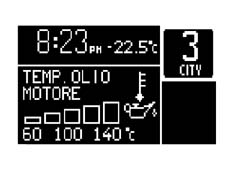
Activation/deactivation of each bar graph element is managed by a hysteresis operating logic that prevents the image from becoming unstable.
Analogue digital conversion table
The characteristic for Analogue / Digital conversion of the engine oil level - NTC type - is:
| Sensor output voltage | no. of bars | Note |
|---|---|---|
| > 468 mVolt | 0 Bars | Low engine oil alarm |
| 412 mVolt - 468 mVolt | 1 Bar | |
| 362 mVolt -412 mVolt | 2 Bars | |
| 300 mVolt -362 mVolt | 3 Bars | |
| 225 mVolt -300 mVolt | 4 Bars | |
| 162 mVolt -225 mVolt | 5 Bars | |
| <162mVolt | 6 Bars | |
| <105 mVolt | Max engine oil level |
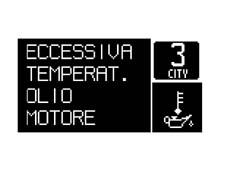
If the temperature exceeds 150°C for longer than 2 minutes, an EXCESSIVE ENGINE OIL TEMPERATURE fault message is displayed and the relevant symbol is displayed in the icon area. Display of this fault requires an "engine running" status check.
WARNING LIGHTS
Specifications
The warning lights can be switched on or off by the NQS via a command from the B-CAN, for the systems that are connected to the C-CAN the messages are made available at the B-CAN via the NBC gateway or for the direct management of the component connected to the NQS.
The warning lights usually come on when there is a fault, but some warning lights also come on at the key-on for less than 4 secs. to indicate the check on the system to which they are connected.
On the HIGH VERSION some warning lights are turned on during the check stage while on the LOW version, they are not turned on at key-on but only in the case of a fault.
Smart warning lights are only used for the AIR BAG system failure warning light.
The circuit is as follows:
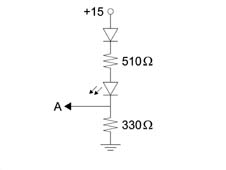
A = Towards the control unit
Operation
Minimum engine oil pressure
The display takes place by means of a symbol on the dot matrix (HIGH) or a LED (LOW).

IGNITION
The warning light is turned on only if the event (fault onset) occurs by a command from the NCM and for 1.5 seconds if the engine rpm is greater than 700 rpm.
SWITCHING OFF
When the message is received from the NCM, if the NQS is disconnected from the B-CAN network and if the engine rpm is lower than 200 rpm.
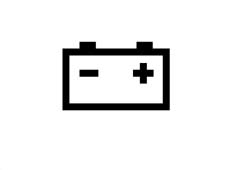
Alternator failure
The information is displayed by means of a symbol on the dot matrix (HIGH) or a LED (LOW).
IGNITION
The warning light is turned on only if the event (fault onset) occurs by a command from the NBC and for 1.5 seconds if the engine rpm is greater than 550 rpm.
SWITCHING OFF
When the message is received from the NBC, if the NQS is disconnected from the B-CAN network and if the engine rpm is lower than 200 rpm.
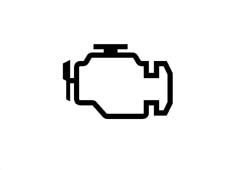
Engine control (eobd) fault
The information is displayed by means of a symbol lit by an LED on the HIGH version. The symbol is also shown on the dot matrix if a fault is present.
The NCM is connected directly to the NQS
IGNITION
The warning light is controlled directly by the NCM (direct connection between the NQS and the NCM).
On the HIGH version only, if the symbol is repeated on the DOT matrix for 1.5 seconds upon receipt of the fault command and if the engine rpm number is greater than 700 rpm.
SWITCHING OFF
The warning light is controlled directly by the NCM (direct connection between the NQS and the NCM).
On the HIGH version, the symbol is repeated on the dot matrix when the fault cessation command is received
The EOBD (European On Board Diagnosis) system continuously diagnoses emission-related components on the vehicle and turns on a warning light on the control panel to indicate any deterioration in the components.
The aim of the system is to:
- monitor system efficiency;
- indicate an increase in emissions due to vehicle malfunction;
- indicate the need to replace damaged components.
Timely intervention to repair the fault that caused the warning light to come on is an obligation that depends on the laws and Highway Code in the country where the car is driven.
Code system fault
The information is displayed by means of a symbol on the dot matrix (HIGH) or a LED (LOW).

IGNITION
The warning light is event-driven (fault onset) by a command from the NBC
The warning light may come on with a fixed or flashing light according to NBC status (see CODE system operation)
SWITCHING OFF
The warning light is turned up when a command is received from the NBC or if the NQS is disconnected from the B-CAN network.
Glow plug preheating (only for jtd engine)
The information is displayed by means of a symbol on the dot matrix (HIGH) or a LED (LOW).

IGNITION
The warning light is turned on at key on when a signal is received from the NCM
SWITCHING OFF
The warning light is turned off when a command is received from the MCM or if the NQS is disconnected from the B-CAN network.
FAULT
LOW version: The warning light is turned on in flashing mode.
HIGH version: The "preheating fault" symbol and message are displayed.
Maximum engine coolant temperature
The information is displayed by means of a symbol lit by an LED. On the HIGH version only, the symbol is also shown on the dot matrix if a fault is present.
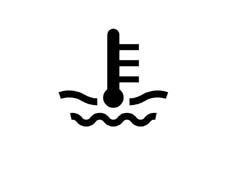
IGNITION
The warning light is turned on at key on for 4 seconds (check stage) and is turned on when a fault signal is received from the NCM
On the HIGH version only, the symbol is repeated on the dot matrix when the fault command is received
SWITCHING OFF
The warning light is turned off after the check stage or after fault cessation when a message is received from the NCM
Or if the NQS is disconnected from the B-CAN network
Fuel reserve warning light
The information is displayed by means of a symbol lit by a LED.

IGNITION
The warning light is turned on at key on for 4 seconds (check stage) and is turned on when a fault signal is received from the NBC
When a sensor/wiring fault message is received from the NBC, the warning light also flashes at a rate of 1 Hz -DC50%
SWITCHING OFF
The warning light is turned off after the check stage or by a signal from the NBC
Or if the NBC is disconnected from the B-CAN network
Or if the NQS is disconnected from the B-CAN network
Side lights
The information is displayed by means of a symbol lit by a LED.

IGNITION
The warning light comes on when a message is received from the NBC to indicate the side lights are on
The warning light also comes on at key off for the PARKING LIGHT function
SWITCHING OFF
The warning light goes off when a side lights off message is received from the NBC or if the NBC is disconnected from the B-CAN network or if the NQS is disconnected from the B-CAN line
If the parking status is active (side lights activated with key off), the side light warning light comes on. The control panel lighting remains off. If the partial parking function is activated (side lights activated only on left side or side lights activated only on right side), the parking light warning light remains off.
Main beam headlamps
The information is displayed by means of a symbol lit by a LED.

IGNITION
The warning light comes on when a message is received from the NBC to indicate the high beams are on
The warning light also comes on at key off for the FOLLOW ME function
SWITCHING OFF
The warning light goes off when a high beam message is received from the NBC or if the NBC is disconnected from the B-CAN network or if the NQS is disconnected from the B-CAN line
Direction indicators
The information is displayed by means of a symbol lit by a LED.
IGNITION
The warning lights come on when a direction indicator on message is received from the NBC (right or left turn signal) or when a hazard light on signal is received from the NBC. In this case, the warning lights are turned on even when the key is OFF.
The flashing rate is given by the NBC.
SWITCHING OFF
The warning lights go off when a direction indicator off message is received from the NBC (right light or left light) or when a hazard light off message is received from the NBC.
The warning lights also go off if the NBC is disconnected from the B-CAN network or if the NQS is disconnected from the B-CAN line.
Doors open warning light
The information is displayed by means of a symbol on the dot matrix (HIGH) or a LED (LOW).

IGNITION
The warning light comes on when a signal is received that one or more doors are open from the NBC
SWITCHING OFF
The warning light goes off when a message is received from the NBC that the doors (all) are closed. It also goes off if the NBC is disconnected from the B-CAN line or if the NQS is disconnected from the B-CAN network.
Exterior lighting failure
The information is displayed by means of a symbol on the dot matrix (HIGH) or a LED (LOW).

IGNITION
The warning light comes on when a signal is received that one or more doors are faulty from the NBC
SWITCHING OFF
The warning light goes off when a message is received from the NBC that the doors (all) are closed. It also goes off if the NBC is disconnected from the B-CAN line or if the NQS is disconnected from the B-CAN network.
Handbrake on/brake fluid level/ebd change warning light
The information is displayed by means of a symbol lit by an LED on the HIGH version. The symbol is also shown on the dot matrix if a fault is present.

IGNITION
The warning light is turned on for 4 seconds (check stage) at key on or upon receiving signals from the NBC in the following ways:
Warning light upon receipt of a handbrake applied message
Warning light and information on dot matrix (HIGH) upon receipt of a low brake fluid level message
Warning light and information on dot matrix upon receipt of an EBD fault message
Warning light and information on dot matrix if the NBC is disconnected from the B-CAN network
Warning light and information on dot matrix if the NQS is disconnected from the B-CAN network
Warning light and information on dot matrix if the NFR is disconnected from the B-CAN network
SWITCHING OFF
The warning light is turned off after the check stage or upon receipt of the following messages.
Upon receipt of a handbrake off message from the NBC (if the warning light was turned on only for this function).
Upon receipt of a brake fluid compliant message from the NBC (if the warning light was turned on only for this function).
Upon receipt of a EBD system compliant message from the NBC (if the warning light was turned on only for this function).
Abs fault
The information is displayed by means of a symbol lit by an LED on the HIGH version. The symbol is also shown on the dot matrix if a fault is present.
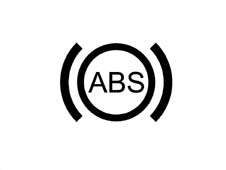
IGNITION
The warning light is lit for 4 seconds at key on (check stage) or upon receipt of a fault message from the NFR (information is also displayed on the dot matrix display on the HIGH version and the warning light is turned on in the following situations:
Warning light and information on dot matrix if the NBC is disconnected from the B-CAN network
Warning light and information on dot matrix if the NQS is disconnected from the B-CAN network
Warning light and information on dot matrix if the NFR is disconnected from the B-CAN network
SWITCHING OFF
The warning light is turned off after the check stage or upon receipt of a system compliant message from the NFR.
Asr/vdc warning light
The warning light is displayed by means of a screen-printed signal lit by a led and a symbol plus information on the dot matrix display.

IGNITION
The warning light is turned on at key on for 4 seconds (check stage) or upon receipt of an operating/fault message (flashing light/fixed light) from the NFR (see ABS system with ASR and VDC). The warning lights are also turned on in the following situations:
Warning light and information on dot matrix if the NBC is disconnected from the B-CAN network
Warning light and information on dot matrix if the NQS is disconnected from the B-CAN network
Warning light and information on dot matrix if the NFR is disconnected from the B-CAN network
The warning light on the panel is not turned on in the case of ASR off. Only the message and symbol are shown on the dot matrix display. The LED on the button comes on when the system is deactivated.
ACTION
The warning light flashes when the system causes the ASR function or the VDC function to cut in to notifiy the driver that the ASR or VDC system has been activated due to the road surface grip condition.
The specifications of the warning flashing on the NFR control are, frequency of 5Hz DC 50%
SWITCHING OFF
The warning light is turned off after the check stage or upon receipt of a system compliant message from the NFR.
Management of ABS - EBD - ASR/VDC fault warning light
The panel receives information on BS, EBD, ASR/VDC warning light activation and deactivation from the NBC via the B-CAN network.
If the LEDs do not come on when a message is sent via the B-CAN network to activate the warning lights, the NQS stores the fault and causes a LED ERROR warning message to appear on the display (LOW version) or an ABS WARNING LIGHT error (HIGH version). This message is displayed for 20 seconds during the check stage and also under normal operating conditions
This fault can be detected using a diagnostic tester.
Air bag failure warning light
The information is displayed by means of a symbol lit by a LED.
The air bag is connected directly to the NQS. The warning light activation command is not sent via the CAN network.

IGNITION
The warning light is turned on directly by the airbag control unit in the case of a fault (see airbag operation)
The warning light also comes on when the NQS is disconnected from the airbag control unit
SWITCHING OFF
The warning light is turned off by a direct command from the airbag control unit.
Passenger side warning light off
The information is displayed by means of a screen-printed symbol lit by a LED
The air bag is connected directly to the NQS. The warning light activation command is not sent via the CAN network.

IGNITION
The warning light is turned on directly by the airbag control unit (see airbag operation)
SWITCHING OFF
The warning light is turned off by a direct command from the airbag control unit.
Seat belt warning light
The information is displayed by means of a screen-printed symbol lit by a LED
The seat belt switch is connected directly to the NQS. The warning light activation command is not sent via the CAN network.
The seat belt warning light indicates "seat belt unfastened" as follows:
- with the ignition ON, if the driver has not fastened their seat belt, the warning light comes on with a fixed light.
- at key-on, if the seat belt is fastened prior to key-on, the warning light stays off.
- if the seat belt is unfastened while driving, the warning light comes on with a fixed light

IGNITION
The warning light is switched on directly by an N.C. switch located in the driver''s belt.
SWITCHING OFF
The warning light is turned off by the opening of a switch on the driver''s seat belt.
Robotized gearbox failure warning light
The warning light takes the form of a symbol on the dot matrix display

IGNITION
The warning light is turned on when a command is received from the NCR (robotised gearbox node)
Or if the NCR is disconnected from the B-CAN network
SWITCHING OFF
The warning light is turned off when a command is received from the NCR
Brake pad wear warning light
The information is displayed by means of a symbol on the dot matrix (HIGH) or a LED (LOW).

IGNITION
The warning light is turned on when a fault message is received from the NBC.
SWITCHING OFF
The warning light is turned off when a pad compliance signal is received from the NBC
Cruise control on warning light
The information is displayed by means of a symbol on the dot matrix (HIGH) or a LED (LOW).
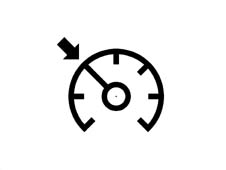
IGNITION
The warning light is turned on when an activation signal is received from the NCM via the C-CAN and B-CAN network
SWITCHING OFF
The warning light is turned off when a cruise control deactivation signal is received from the NCM
The warning lights also go off if the NQS is disconnected from the B-CAN network and if the NCM is disconnected from the C-CAN line.
CLOCK/DATE
Specifications
The clock is shown on DISPLAY (2), i.e. on the segmented LCD display on the LOW version and on the reconfigurable dot matrix display on the HIGH version.
In 24h mode, the reading is in hours and minutes and the range is from 0:00 to 23:59
In 12 h mode, the reading is in hours and minutes and the range is from 1:00 to 12:59. The indication AM changes to PM when the clock changes from 11:59 to 12:00 during the day and conversely changes from PM to AM when the clock changes from 11:59 to 12:00 during the night.
After each battery connection or processor reset, the clock indicates 0:00 (or 12:00 in 12h mode) and the two points between the hours and minutes flash at a rate of 0.5 Hz - DC 50%.
Clock adjustment
When the mode key is pressed, the hours/minutes flash at a rate of 0.5 Hz - DC 50%
The keys (+ and - ) are used to adjust the hours as follows:
Nothing happens when the key is pressed for < 0.05 seconds.
The digit changes by 1 step/sec when the key is pressed for > 0.05 sec and < 2 sec
The digit changes by 5 step/sec when the key is pressed for > 2 secs and <4 seconds
The digit changes by 10 steps/sec when the key is pressed > 4 secs
When the 5 or 10 step mode is active, the reading moves on to the next value divisible by 5 or 10 respectively.
Press mode is change from hours to minutes. The minutes can be altered using the method used to correct the hours.
When the mode key is pressed again, the setting is accepted and the minutes cease flashing.
While setting hours/minutes, when the setting is confirmed, the seconds value is restored to zero.
During modification, the digits (:) do not flash; the digits (:) begin to flash again when the setting is confirmed.
If no key is pressed for 10s during the adjustment stage, the gauge changes to the standard screen without accepting the last setting and then the previous time is displayed.
The adjustment keys (Mode, +, -) are not on the panel.
The NQS reacts to key depression and not release.
The clock can be displayed only with key on.
Time setting/adjustment may be carried out only with key on and vehicle speed less than 3 km/h)
Clock
LOW
The 12 h mode is activated only by the supplier and cannot be adjusted by the customer. AM and PM are not indicated in this mode. Press the mode key to enter clock set-up mode.
HIGH
The 12/24h mode is activated from a menu and thus adjustable by the user.
AM and PM are indicated in 12h mode.
Press the mode key to enter clock set-up mode.
Summer time, Greenwich meantime can be selected from the menu. One hour is added by changing from OFF to ON (Greenich meantime is active). One hour is subtracted by changing from ON to OFF) (summertime is active).
Date (only high)
The date range is 1999 to 2099. The display format is DD MM
The current year is not displayed. Leap years are calculated automatically.
Impossible dates are not shown when the date is updated, e.g. the 31st is not shown when the month only has 30 days.
Intertia switch activated signal
The user is informed if the inertia switch has cut in at each key on.
In the LOW version, the FPS on message is displayed in flashing mode - frequency 0.5 Hz d.c. 50 % on (FPS = Fire Prevention System).
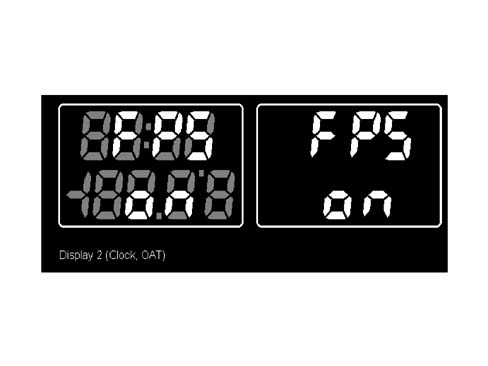
On the HIGH version, the Inertia switch on + relevant symbol is shown on the matrix display.

At key off, the switch status is downloaded for a maximum period of 30 seconds. The NQS makes available the inertia switch on message to all CAN network nodes.
PANEL LIGHTING
Specifications
The panel lighting is divided into different areas, as follows:
- For the LOW version:
- speedometer graphics lighting (activated only with the +lights signal)
- graphics lighting: fuel level gauge, coolant temperature gauge, rev counter (active only with +lights signal).
- Odometer display lighting (1) and Clock/T.ext. display (2).
- For the HIGH version:
- speedometer graphics lighting (activated only with the +lights signal)
- graphics lighting: fuel level gauge, coolant temperature gauge, rev counter (active only with +lights signal).
- odometer display lighting (1)
- reconfigurable matrix display lighting. (2) - main information/message area.
- reconfigurable matrix display lighting. (2) - area dedicated to warning lights.
Operation
The lighting LEDs are activated when the side light activation signal is received from the NBC via the B-CAN line. The tool can activate the lighting LED when the NQS is separated from the B-CAN network
The panel lighting, apart from the speedometer scale lighting, can be deactivated.
For partial deactivation, operate (with side lights on) the 0km key for a time of 4 < t < 10s (in this case, the partial mileage is not zeroed)
If one of the unlit indications is in warning mode (e.g. fuel reserve, coolant temperature > 100°C, rpm > beginning of red area of scale, dot matrix display warning), the entire panel lighting will always come on and stay on until the warning is removed.
After key-on and +lights-on, the entire panel lighting will always be activated.
Dimming
The driver can adjust light intensity by means of the "MODE +" and "MODE-" keys (outside the NQS) if it is not possible to adjust it via the menu.
The brightness can never be reduced to zero
The dimming value (0-10) is transmitted by the NQS via the B-CAN to allow the brightness value to be sent to the other Nodes.
If the side lights are deactivated, then the display lighting is 100% and it can be adjusted (dimmed) (high line only).
The failure signal LEDs cannot be adjusted/dimmed
On the HIGH line version, the area of the reconfigurable dot matrix display devoted to the fault icons cannot be adjusted/dimmed
Lighting adjustment display mode (low version)
The adjustment operation is shown on the ODOMETER DISPLAY (1), as follows:
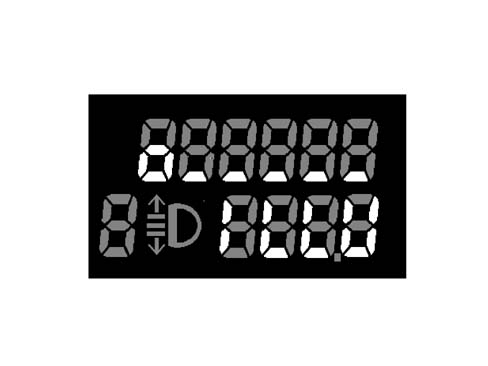
lighting at minium (2.5%).
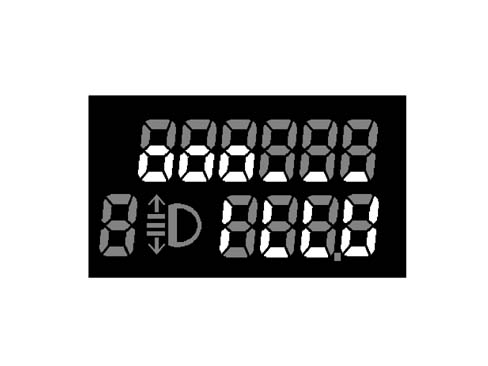
Example of 25% lighting.
The lower segments (on the upper row) represent unselected adjustment steps.
The circles ("0") represent selected adjustment steps. Each circle represents 2 adjustment steps. Correspondence between selected steps and light intensity is defined in the the corresonding table.
Lighting adjustment display mode (high version)
The adjsutment operation is displayed on the reconfigurable matrix display as follows:
Example of 70% lighting.
The reconfigurable display shows a bar diagram made up of 11 bars of ascending height. The bars shown only in outline form represent unselected adjustment steps. The bars that are filled on are selected adjustment steps. Each bar represents 1 adjustment step.
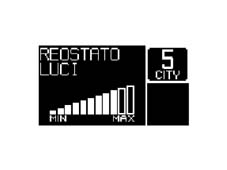
Brightness adjustment table
The relation which governs the connection between the level of brightness and the bars shown on the display is defined in the table below:
| Number of bars visible (LOW) | Number of bars visible (HIGH) | Brightness in % | Note |
|---|---|---|---|
| 1 | 1 | 2,5 | minimum brightness > 0 |
| 1 | 2 | 5 | |
| 2 | 3 | 10 | |
| 2 | 4 | 15 | |
| 3 | 5 | 20 | |
| 3 | 6 | 25 | |
| 4 | 7 | 40 | |
| 4 | 8 | 55 | |
| 5 | 9 | 70 | |
| 5 | 10 | 85 | |
| 6 | 11 | 100 | maximum brightness |
LOW version:
If the side lights are off (+lights off), only the two displays are lit to 100% brightness.
If the side lights are on (+lights on), the graphics and display are lit at the same time as the defined setting level. The brightness may then be adjusted as defined in the above table.
HIGH version:
- If the side lights are off (+lights off), the displays are lit and may be adjusted.
- If the side lights are on (+lights on), the displays are lit and may be adjusted.
Behaviour at key-on: at key-on with the +lights on, the graph is always lit up at the adjusted light level.
Behaviour at key-off: at key-off the adjustment value set is memorized and used for the next key-on.
Disconnecting the battery or resetting the system does not cause the memory to be lost. When the battery is connected the value set should be the one adjusted prior to the disconnection of the battery.
OUTDOOR TEMPERATURE READING
The outdoor temperature reading is displayed:
- LOW version: on the segment display (2)
- HIGH version: on the reconfigurable matrix display.
The control panel receives temperature information expressed in degrees centigrade from the NBC via the B-CAN network.
If the outside temperature is shown on the segment display (2), if the received temperature level is higher, in absolute values, than the value represented by two digits (-99/+99), ± 99°C will be displayed with a plus or minus sign according to the input sign.
A "+" sign will not be displayed for a positive temperature.
If the temperature is equal to "0", the "-" sign will not be displayed.
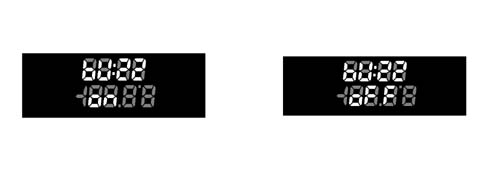
Some examples are shown below.
HIGH version:
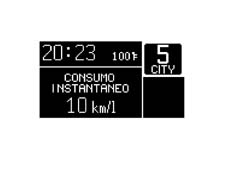
Screen with TRIP Computer function active - Automatic Transmission (Selespeed)
The first screen shows degrees centigrade
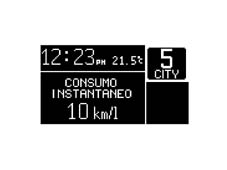
The second shows degrees Fahrenheit
LOW version:
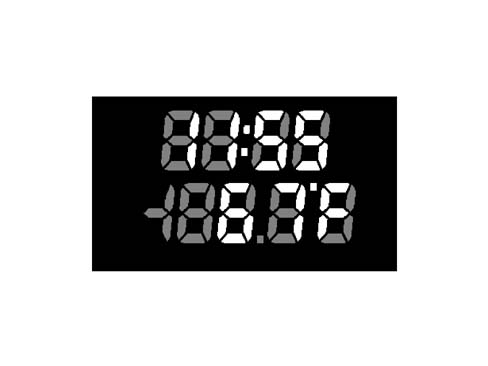
The first screen shows degrees centigrade
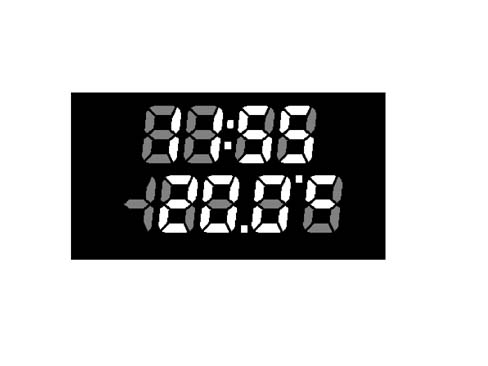
The second shows degrees Fahrenheit
Example of error
LOW version:
If the sensor is faulty, the NQS shows the following message instead of the temperature reading: "--°F" or "-.-°C".
HIGH version:
If the sensor is faulty, the NQS shows the following message instead of the temperature reading: "---" instead of the units + "F" and "C".
Display of "danger of ice" signal
Specifications
To warn the driver of the possible presence of ice on the road when the measured outdoor temperature is Text = 3 °C, an ice warning cycle is displayed.
This mode is run once only after detecting that the outdoor temperature is equal to Text = 3°C and is repeated only when the outdoor temperature reaches + 6°C and then drops to +3°C (hysteresis of 3°C)., the buzzer does not sound again if the temperature does not reach + 6°C and then drops to +3°C.
If the outside temperature at key-on is T = 3° C, then the display shows the specified page at key-on for the first 10s and later initiates the "warning cycle".
If the "warning cycle" is interrupted by a fault message (greater priority), it is nevertheless resumed at the end of the above fault.
Warning cycle
LOW version:
the temperature reading is shown and flashes for 10 seconds at a rate of Hz, D.C.50% ON; the buzzer produces an Alarm beep 1 acoustic signal.
HIGH version
the temperature reading is displayed (in flashing mode - frequency of 1Hz d.c. 50% ON) and the message "Snow symbol + warning ice danger" for a time period of 10 seconds; the buzzer produces an Alarm beep 1 signal

At the end of the warning cycle:
- the message disappears, the temperature reading stops flashing,
- the "snow symbol" is shown in the specially dedicated area of the display (as long as the condition T = 3°C persists) and the screen prior to the anomaly event reappears.
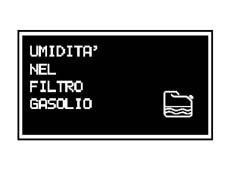
Display of "water in diesel filter" signal (only for jtd engines)
Specifications
To notify that driver that moisture is present in the diesel filter, a message and symbol are displayed
HEADLAMP ALIGHMENT CORRECTOR (EXCEPT FOR VERSIONS WITH GAS DISCHARGE HEADLAMPS)
The headlamps may be adjsuted from 0 to 3 using the "^" and " v" (outside the panel on the left keypad). the setting is stored and indicated on the odometer display together with the symbol.
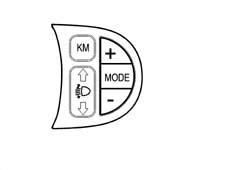
The NQS receives and sends an increase signal (CAF+) or decrease signal (CAF-) from a switch on the left keypad to the headlamp adjustment module (integral with the NQS).
The adjustment module checks for the presence of a headlamps power supply positive from Fuse F13 and generates an adjustment signal, which it sends to the headlamp alignment motor electronic control circuit. The instrument output signal is a voltage value that is interepreted by the actuator fitted to the headlamp;
At KEY OFF, no adjustment is possible. At KEY ON, the last stored value is stored but the number and symbol are not shown on the panel until the low beams are turned on.
Prolonged operation of the key does not bring about progressive adjustment. Disconnecting the battery or resetting the system causes the memory to be lost. After reset, it begins from zero again (default value).
TRIP COMPUTER (PRESENT ONLY ON HIGH VERSION)
Specifications
The TRIP computer is only on HIGH LINE instrument panels and is used to display trip data on the reconfigurable matrix display.
Two separate TRIP modes (A and B) are present. These are activated by a dedicated button in the sequence shown:
| TRIP A |
|---|
| instant fuel consumption |
| Average fuel consumption |
| Range |
| Average speed |
| Trip time |
| Distance travelled |
| TRIP B |
|---|
| Average Fuel Consumption - B |
| Average speed - B |
| Trip time - B |
| Distance travelled - B |
When the TRIP function is activated (transition from INACTIVE to ACTIVE status), the NQS generates acoustic feedback (roger beep). Additional acoustic feedback is generated when the key has been hold down for > 4 seconds to zero the data.
Counting/update of TRIP data takes place only with the engine running, i.e. only when the control panel receives a fuel consumption signal from the Engine Control Unit (including cut-off mode, i.e. zero fuel consumption and rpm higher than 300 rpm).
The interval between one reset of TRIP data and the next is defined as the mission. This reset may take place as follows:
Using the key (pressing for t > 4 secs): resetting by manual reset of one of the TRIP data items automatically resets all the others (apart from RANGE and INSTANTANEOUS FUEL CONSUMPTION). After this, the count for each data item proceeds independently of the rest.
Resetting the Main TRIP also resets TRIP B. The reset of TRIP B is independent.
The odometer reset (shown as specific segments on the display) does NOT lead to TRIP reset.
Automatic:
- when the distance travelled data item reaches the mileage limit of 4999.9
- when the trip time reaches the counter limit of 99.59
- every time the battery is reconnected
- only for TRIP B: when the time elapsed between key-off and the next key-on is greater than two hours.
Whenever the battery is connected, all the TRIP values are reset. Measurement unit adjustment via the menu is maintained at all times. At each key-on, the same values displayed at the previous key-off are stored in the memory. A message indicating the active TRIP function is shown on the display
Operation
The control panel receives the following information to compute these data:
| Control panel input | Received from |
|---|---|
| Instantaneous mileage | Body Computer |
| Fuel level (as a percentage of a full tank) | Body Computer |
| Fuel reserve level | Body Computer |
| Fuel tank capacity | Body Computer |
| Vehicle speed | Body Computer |
| Instantaneous fuel consumption (litres/hour); | Engine management control unit |
| Trip time counted | Internal clock |
The instrument calculates the trip data as follows:
Distance travelled
The distance travelled by the vehicle from the beginning of the mission is indicated, i.e. since the user reset the counter by pressing the dedicated key. The reading is consistent with the display on the mileometer.
When the maximum possible mileage value is reached, the mileage display resets to zero automatically. A total TRIP computer reset is then performed.
The mileage reading is displayed with the following characteristics:
- range between 0-4999.9 km
- resolution equal to 0.1 km
- update of display: every 0.1 km - The function is active from key on.
Trip time
The trip time shows the time elapsed from the start of the mission, i.e. since the user reset the counter by pressing the TRIP key or an automatic reset occurred
Each time the battery is reconnected and at the beginning of each mission, the display shows "00:00", after which the calculated value is displayed.
At each key-on, the value stored at the previous key-off is displayed, except for the TRIP counter that automatically resets after the vehicle is parked for 2 h
If the vehicle is parked with the engine off (key off), the accumulated trip counter stops but does not reset to zero. The count resumes as soon as the vehicle sets off again (next key on - engine running).
The function is active from key on, with the engine running.
The mission time is displayed in hh mm with the following characteristics:
- range between 00:00 and 99:59
- resoluition equal to 1 min.
- display updated every minute
- data update every second
When the maximum possible value is reached (99.59) the mileage display resets to zero automatically. A total TRIP computer reset is then performed
Average speed
The average speed is calculated from the beginning of the mission, as a ratio between distance travelled and trip time.
Vm = distance travelled/trip time
The calculation is performed only with the engine running.
Each time the battery is reconnected and at the beginning of each mission, the display shows "----" for the first 10 seconds (10s), after which the calculated value is displayed.
At each key-on, the value stored at the previous key-off is stored, except for the TRIP B counter that automatically resets after the vehicle is parked for 2 h.
The displayed average speed must be equal to"----", whenever:
- the user resets the counter by pressing the dedicated button.
- the distance travelled and/or trip time parameters are reset.
The average speed value is displayed with the following specifications:
- range between 0 - 250 km/h *- resolution equal to 0.1 km/h
- calculation precision: = 0.1 km/h
- display updated every 10 s ± 0.1s (10s)
Average fuel consumption
Average fuel consumption measn the ratio between distance travelled since the start of the mission and number of litres consumed since the start of the mission.
Cm = distance travelled/litres of fuel consumed
The control panel downloads the fuel consumption signal via the B-CAN network and processes it to divide it by the distance travelled since the start of the mission.
At the start of a new mission, due to battery disconnection or TRIP computer reset, the average fuel consumption value is reset to the individual predefined average standard fuel consumption value for the vehicle/engine version.
A weighting to be attributed to the above initial value to avoid excessive changes in the reading shown during the first few minutes of the mission.
After this, the reading tends to represent the true mission fuel consumption.
The value displayed is equal to "----" for the first 10 seconds, after which the figure calculated is displayed.
At each key-on, the value stored at the previous key-off is displayed, except for the TRIP counter that automatically resets after the vehicle is parked for 2 h
In caso di sosta con motore in moto (semaforo, ecc.) l''aggiornamento del valore di consumo medio visualizzato diventa funzione del consumo istantaneo acquisito, essendo che i km percorsi rimangono fissi (incremento nullo).
The value is displayed with the following specifications:
- risoluzione pari a 0,1 km/l
- calculation precision: = 0,1 km/l
- l''aggiornamento su display ogni 10 s ± 0,1s
- valore max. indicato pari a 50 km/litro - 2 l/100km
- valore min. indicato pari a 4 km/litro - 25 l/100km
Consumo istantaneo
Per consumo istantaneo s''intende il valore di litri di carburante consumati dal veicolo nella missione il dato viene calcolato sulla base del segnale di consumo trasmesso dalla centralina controllo motore,. The instrument panel acquires the consumption signal via the B-CAN
The value displayed is designed to allow the user to appreciate the differences in consumption linked to the style of driving,
When the battery is connected, the value displayed should be equal to "----" for the first 10 seconds, after which the figure calculated is displayed.
For the calculation of the instant consumption, in order to avoid the value displayed varying too much, a "predefined average standard consumption" figure is used (personalized for the vehicle/engine type); afterwards the weight of the initial reading gradually becomes less important and the consumption figures are used.
Con la vettura in moto ma velocità = 0, il valore visualizzato deve essere pari a "----".
The value is displayed with the following specifications:
- resolution of 0.1 km/l* - calculation precision: = 0.1 km/l *- max reading equal to 50 km/litre - 2 l/100km
- min reading equal to 4 km/litre - 25 l/100km
Range
The range indicates the estimated distance (in km or miles) that the car could travel with the fuel currently in the tank, assuming the mission is continued applying the same driving style (same fuel consumption conditions). This value is calculated using information received from:
Body Computer:
- fuel level (as a percentage of a full tank);
Engine management control unit:
- reference fuel consumption calculated by the control unit
Value storedi in the instrument panel:
- fuel tank capacity (litres)
Range in km is calculated by multiplying the reference fuel consumption by the number of litres of fuel in the tank or by dividing the litres of fuel present in the tank by average mission fuel consumption.
When the battery is connected, the value displayed should be equal to "----" for the first 30 seconds, after which the figure calculated is displayed.
At each key on, the value stored at the previous key off is stored.
During the mission, the displayed range is updated by amounts proportional to the difference between the displayed value and the calculated value to avoid excessive fluctuations.
More specifically:
- if the difference between the calculated value and the displayed value exceeds 40 km, the change in displayed range is equal to one sixth of the difference.
- if the difference between the calculated value and the displayed value is between 6 km and 39 km, the change in displayed range is equal to 3 km
- if the difference between the calculated value and the displayed value is less than 6 km, the change in displayed range is equal to 1 km
When the fuel level is on the reserve, i.e. reserve warning light on, and range is lower than 50 km, no more data is transmitted to the user (but the range count continues). In other words, the display shows the message "attention - refuelling necessary" + symbol for 20 s followed by "----".
Even if the trip screen is not active, when the above limit is reached (range lower than 50 km), the message is displayed as described above and then the display returns to the screen active at the time the anomaly event occurred.
If the vehicle is refueled, the new range value is immediately displayed.
When fuel has been added, if the range is still lower than the required limit (50 km), no reading is displayed and the indication "----" remains.
The refuelling information is downloaded as described in the chapter on the fuel level gauge.
If the vehicle is at a standstill ( < 3 km/h) with the engine running (e.g. traffic lights - traffic jam), the last value before the vehicle was parked is shown for 3 minutes after which the indication "----" appears.
The display is returned to normal operating mode with vehicle speed > 3 km/h. The range value is updated taking into account the fuel consumed while the vehicle is parked, considering driving style prior to the halt (last 5 minutes).
The range calculation is always active
The range value is displayed with the following specifications:
- calculation precision: = 1 km)
- resolution: 1 km
- display updated every 30 s ± 0.1s
- max reading equal to 1999 km
- min indicate value equal to 50 km, after which the following indication is shown "----"
Recovery
If the computer is not connected to the B-CAN network, all the TRIP counters show the message "not available" instead of a reading together with a description of the data characteristics.
If the speed sensors are faulty, all the TRIP counters display dashes "----" together with the data characteristics of each item (km for range, km/h for average speed etc.).
If the fuel sensor is faulty, dashes "----" are shown only for Range and Average fuel consumption together with descriptions of each data characteristic.
If the fault disappears, the count of the various items continues in their different ways and the values downloaded prior to the mission are not reset and the mission is not restarted.
ROBOTISED GEARBOX DISPLAYS (SELESPEED) (PRESENT ONLY ON HIGH VERSION)
The NQS receives information on the speed engaged from the NCR (robotised gearbox mode) and displays it on the dot matrix screen as follows:
- Speed number :1,2,3,4,5,R.N, this information is supplied by the gear engaged signal from the NCR
- City selection: this information is supplied by the gear change mode signal
If this message is not available or if the gearbox is not SELESPEED, the NQS does not display a speed indication.
The speed engaged indication is also shown at key off as long as the active matrix display is lit (see paragraph on the matrix display)
The number indicating the gear engaged also flashes when the NCR determines that the gear selected by the driver is no longer correct for the vehicle speed, the flashing rate is ± 0.5 Hz with DC 50%.
If the SELESPPED is faulty, the NQS receives fault information and displays it by means of a special symbol that flashes on the dot matrix screen. The flashing rate is ± 0.5 Hz with DC 50%.
When the message is received (buzzer required), the NQS activates the buzzer with the Beep Alarm 3 sound.
ACOUSTIC FUNCTIONS
Specifications
The NQS contains a buzzer that emits the following acoustic signals.
Key operation: roger beep tone to denote operation of one of the passenger compartment keys
The NQS receives a roger beep activation signal from the other nodes via the B-CAN network
The keys that give rise to the acoustic signal are:
- front window controls
- controls on the left keypad
- controls on the central keypad except the HAZARD key
- controls on the climate control system
Signal for the following alarm types:
- Alarm beep 1
- Alarm beep 2
- Alarm beep 3
The NQS manages the type of alarm according to the signals received from:
- B-CAN network
- From systems connected directly to the panel
- From functions inside the panel
The NQS generates a corresponding acoustic signal as described below.
The buzzer management strategy is as follows:
- roger-beep: frequency 1.5 kHz, duty cycle 50%, duratation 50ms
- alarm beep 1: frequency 4 kHz, duty cycle 50%, duratation 2 s - modulation equal to 1Hz dc 70%
- alarm beep 2: frequency 4 kHz, duty cycle 50%, duration dependent on function - modulation 2Hz dc 50%
- alarm beep 3: frequency 4 kHz, duty cycle 50%, duratation dependent on function
The NQS manages the buzzer activation priorities. The priorities are:
- Roger Beep: 3
- Alarm beep 1 2
- Alarm beep 2 1
- Alarm beep 3 0 MAXIMUM PRIORITY
If several acoustic signals are received simultaneously, only the signal corresponding to the highest priority message must be generated. The others are aborted.
Danger signals
The danger signals are:
- If the doors are open and if the vehicle exceeds a speed of 3 km/h for longer than 4 s, the acoustic signal is alarm beep 2 type.
- if the handbrake is on and if vehicle speed is other than zero for longer than 4 s, an alarm beep 2 signal is generated.
If the doors are open and the handbrake is on, the signal is timed (for about 10 seconds) and repeated only at key on
When anomaly events occur, an alarm beep 1 alarm signal is generated;
If the speed limit set through the menu is exceeded, an alarm beep 1 signal is generated,
If the speed limit set for Arabia is exceeded, an alarm beep 3 signal is generated,
If the temperature is lower than a set threshold, an alarm beep 1 alarm signal is generated,
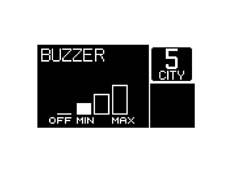
Adjusting the buzzer volume
LOW version:
The buzzer volume (for the roger beep function) may be activated or deactivated by pressing the MODE key.
HIGH version:
The buzzer volume may be set to 4 different levels. Buzzer volume for the roger beep function can be adjusted from 100% to 0% as shown in the table. For the alarm signal, the buzzer volume may be adjusted to a minimum value of 10% as shown in the table, even when the "off" level is selected.
SERVICE COMPUTER (PRESENT ONLY ON HIGH VERSION)
Display for information for the SERVICE function)
When the next service is due, the message "SERVICE DUE IN....." is displayed at key on followed by the number of kilometres in which the service is due (after the initial check procedure lasting 4 s).
The procedure is as follows:
- the message is displayed directly and only at key-on when the kilometre value is less than or equal to 2000
- then the message is displayed once only at key on when the mileage value is less than or equal to 1800, 1600, 1400, 1200, 1000, 800, 600, 400, 200 and 100 kilometres respectively
- the last messages are issued at 50 and 0 kilometres, after which no more messages are displayed even if the driver has not carried out the service.
This function can be reset only during technical service by means of a special diagnostic tester.
The SERVICE function can be activated only with the vehicle parked (< 3 km/h).
RECONFIGURABLE MATRIX DISPLAY (HIGH VERSION)
Specifications
The display uses a black and white DSTN (Double Layer Twisted Nematic) screen. This particular type of liquid crystal display offers greater contrast and a higher angle of correct viewing than conventional TN LCD displays.
Its size is 120x64 pixels
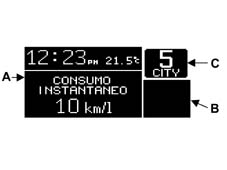
The NQS matrix display contains 2 main areas plus a special area for vehicles with the SELESPEED gearbox.
Area A for messages
Zona B measuring 32x 32 pixels for warning light symbols in which the colour can be changed to adapt to the warning lights to be displayed (Amber, Red and Green)
Area C for vehicles with Selespeed. Used to display the speed engaged and the operating mode
In versions without a Selespeed gearbox, area C is used as area A (message area)
Example of a screen
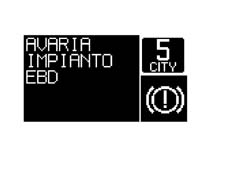
Example of a screen with a fault
The matrix displays fitted to selespeed vehicles are heated to ensure the speed engaged information becomes visible very quickly at very low environmental temperatures
At key off and when a door is opened and closed, the matrix is turned on for a few seconds to display the selespeed speed engaged. The function also extends to vehicles without the Selespeed
Functions displayed
The following table shows the functions that can be displayed on the active matrix under different conditions
| FUNCTIONS | Always present | At key-on | Event-driven | On request |
|---|---|---|---|---|
| Clock | X (1) | |||
| Date | X (1) | |||
| Outside temperature | X (1) | |||
| Signalling of danger of ice | X | |||
| Reconfigurable warnings lights + messages | X | |||
| Check | X | X | ||
| Automatic transmission info (Selespeed) | X | |||
| Trip Computer | X | |||
| Service | X | X | X | |
| Radio info | X | X | ||
| Telephone info | X | X | ||
| SMS (reception) | X | |||
| Navigation with pictograms | X | |||
| Destination info | X | |||
| Route info | X | |||
| Vehicle set-up menu | X |
(1) Not present if insufficient space on the display.
Screen page at key on
At key on, the standard screen is immediately displayed. At the same time, the check stage starts and a "check in progress" message is displayed.
If:
- the check stage concludes with a positive outcome,
- the initial check time of 4s has elapsed
- the engine speed corresponds to 700 rpm for at least 1.5 secs. from the moment this threshold level is reached.
An OK message is displayed and remains for 3s.
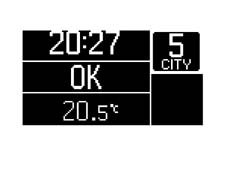
CHECK OK message on the automatic transmission version.
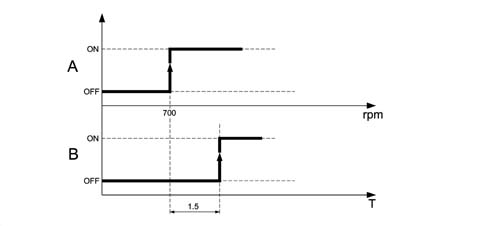
A = Validity threshold for display of the check ok message
B = Timer for display of the check ok message
After display of the "check OK." message The matrix display shows (if present) data relating to:
- radio system
- navigation system
- telephone system
with the following modes
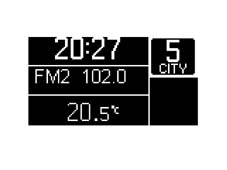
Display (repetition) of information on the radio function.
When the function is active (and activated via the set-up menu), the following information is displayed:
Frequency of broadcasting radio station and RDS information
TAPE function active message
CD function active message with display of track.
Example of screen with radio active
Display of information for the navigation system function
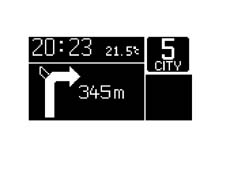
When the function is active (and activated via the set-up menu), the following information is displayed:
- navigation system pictogram
- distance to the next turn-off
Example of a screen with navigation system
Display of information relating to the telephone function
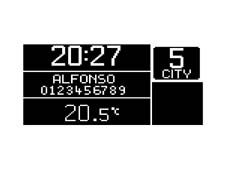
When the function is active (and activated via the set-up menu), the following information is displayed:
- caller''s phone number
- notification of receipt of an SMS (text message): a symbol indicating the presence of an unread message is displayed in the area reserved for warning lights. The message may be read from the display on the facia (only for vehicles with an NIT)
- incoming call notification,
Example of screen with phone system built into the NIT
Display of information relating to the robotised gearbox
The ROBOTISED GEARBOX information is always present under al service conditions.
Fault display
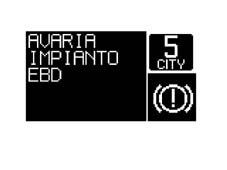
When a fault occurs, symbols relating to the fault/function diagnosed are displayed and simultaneously a fault discription is shown on the display. An alarm beep 1 acoustic signal is also generated.
All the other information is not displayed (clock/date/outside temperature/radio info etc.).
If automatic transmission information is present, this is still displayed.
Example of fault indication area
List of faults and statuses displayed by the instrument panel
| FAULTS | STATUS INDICATION |
|---|---|
| ENGINE CONTROL SYSTEM FAULT | INCOMPLETE CLOSURE OF RIGHT FRONT DOOR |
| CODE SYSTEM FAULT | INCOMPLETE CLOSURE OF LEFT FRONT DOOR |
| EBD SYSTEM FAULT | INCOMPLETE BOOT FLAP CLOSURE |
| FAULT IN RIGHT SIDE LIGHTS | POSSIBLE ICE ON ROAD |
| FAULT IN LEFT SIDE LIGHTS | INERTIA SWITCH ON |
| REAR FOG LAMP FAULT | SEE SERVICE |
| NUMBER PLATE LIGHT FAULT | ATTENTION REFUELLING NECESSARY |
| BRAKE LIGHT FAULT | FRONT BRAKE PAD WEAR |
| BRAKE LIGHT FUSE FAULT | MAX ENGINE COOLANT TEMPERATURE |
| ABS FAULT | LOW BRAKE FLUID LEVEL |
| AIR BAG SYSTEM FAULT | LOW BATTERY CHARGE |
| VDE SYSTEM FAULT | LOW ENGINE OIL PRESSURE |
| ABS WARNING LIGHT FAULT | VDC NOT ACTIVE/VDC ACTIVE |
| EBD WARNING LIGHT FAULT | ASR NOT ACTIVE/ASR ACTIVE |
| VDC WARNING LIGHT FAULT | SERVICE DUE IN...... |
| GLOW PLUG WARNING LIGHT FAULT | PRESENCE OF WATER IN DIESEL FILTER |
| HARDWARE ERROR WARNING LIGHT |
Fault display logic
If a message and associated symbol are displayed:
- the written message remains for 20 seconds and then disappears. It then reappears with the symbol at the next key on for the above time (until the underlying fault is removed). If the fault disappears during the display cycle, the message + symbol are displayed for a minimum time of 2 seconds.
- The symbol is maintained in the dedicated area (bottom right) of the display and must stay there until the underlying fault cause is resolved.
- then, when the display cycle is complete, the screen prior to the fault event reappears unless it was displayed in the dedicated area of the display occupied by the fault symbol.
Example: Fault event
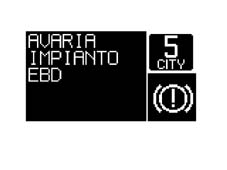
Example: display after indication time
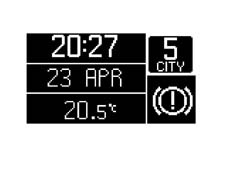
When the MODE key is pressed, it is possible to return to the standard screen (the display cycle speeds up, normally 20s) to conclude the display of:
- message + symbol (when the fault is already displayed by means of leds on the panel)
- message (symbol remains present on the matrix display if no led is present on the panel corresponding to the indicated fault)
If the NAVIGATION SYSTEM function is active:
- the written message persists for 20 seconds, alternating with he navigation system screen in rolling mode as defined in the display priority paragraph, and then disappears. It nevertheless reappears at every subsequent key on for the above time until the underlying fault cause is resolved.
- the navigation system fault prior to the fault event then reappears.
- The symbol is postioned in the dedicated area for the display of symbols and must stay there until the underlying fault cause is resolved.
Display logic with engine running
The control panel must detect engine running status as follows for the low battery charge, low engine oil pressure and EOBD fault messages:
- Engine start-up stage: the instrument panel is enabled to signal the fault message only if the engine rpm exceeds 550 rpm (upper threshold) for at least 1 s (time hysteresis) from the moment this speed level is exceeded.
- Normal operating condition: the instrument panel is only enabled to signal the fault message if the engine rpm remains above 200 rpm (lower threshold)
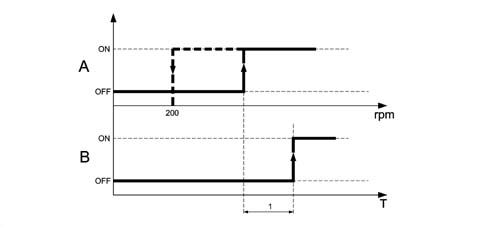
A = Fault signal validity threshold
B = Timer for display of the fault message
| RPM threshold value | |
|---|---|
| Oil pressure warning light | 700 |
| EOBD warning light | 700 |
| Alternator fault warning light | 550 |
The rpm/reference time values are programmed by the control panel supplier.
Led display
If fault information is displayed by means of dedicated warning lights on the control panel (not on the matrix display), the message + symbol are always displayed on the reconfigurable LCD display.
The written message + symbol remain for 20 seconds and then disappear (both. They reappear at each subsequent key on for the above time until the underlying fault cause has been resolved. If the fault disappears during the display cycle, then led + message + symbol remain for a minimum of 2 seconds and go out later on at the same time.
The following faults are considered:
- engine coolant temperature, low brake fluid level, EBD failure, ABS failure, ASR failure, VDC failure, EBD failure (braking system), EOBD failure (emission control system)
DISPLAY LOGIC IF MORE THAN ONE FAULT IS PRESENT SIMULTANEOUSLY
If more than one fault is present simultaneously, they are displayed for 5 seconds each in rolling mode. The overall display time is related to the underlying logic and thus they must remain for 20 seconds (per fault) until the message + symbol display cycle has concluded. After this only the symbols will be displayed.
If another fault arises during the display of a fault message (message + symbol cycle), the most recent fault supersedes the previous fault only after the latter has been displayed for 2 seconds. The subsequent display mode is still the rolling type described previously (overall time 20 s). If several display cycles are in progress, only screens consisting of message + symbol are displayed in rolling mode. When one of the cycles concludes (after 20 s), the other cycles must also conclude before display of the warning lights alone reappears in rolling mode.
If the events do not occur simultaneously, the most recent fault is displayed in the same way as described for display of the first fault, i.e. the message + symbol persist for 20 seconds. After this, the message disappears and the symbol alone remains and the display alternates with the symbols already present in rolling mode (5 seconds each).
Example: simultaneous management of 3 faults
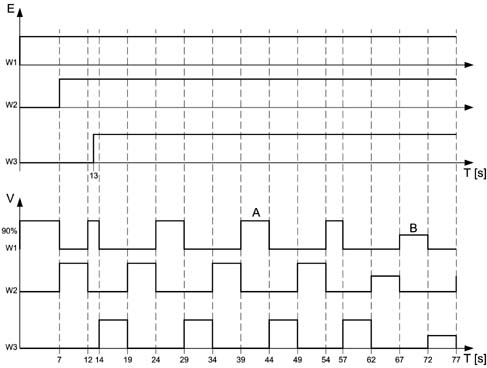
A - message + symbol
B - symbol alone
E - event
V - display
Display priorities
First level priority: fault/speed thresholds
If faults are present the message + corresponding symbol are always displayed for a time period of 20 seconds
If the NAVIGATION SYSTEM function is active:
the fault message and navigation system information alternate in rolling mode until the fault warning cycle is complete (total of 20 seconds).
Example:
- 5 seconds. fault, total 5 s
- 5 seconds. navigation system
- 5 seconds. fault, total 10 s
- 5 seconds. navigation system
- 5 seconds. fault, total 15 s
- 5 seconds. navigation system
- 5 seconds. fault, total 20 s
- navigation system
If the navigation system needs to communicate new route changes during the 5 second fault message display, the navigation function display automatically reappears (superseding the fault display after 2 seconds of display time).
This display must last for the requird 5 seconds. The warning cycle must proceed to completion.
During the display cycle for fault messages lasting 20 s, the MENU (set up) functions cannot be activated (inhibited); all the other functions (activated from the steering wheel or directly from the console) can be activated but no message is shown on the display.
The warning message that the SPEED LIMIT has been exceeded is always displayed (with a buzzer).
Second level priority: navigation system
When the navigation function is activated, the display of all messages corresponding to the functions activated by the centre console (e.g. radio, climate control, telephone, etc.) is inhibited
However, the display of messages corresponding to the following functions, which can be activated using the special buttons on the steering wheel, remains activated:
If the navigation system needs to communicate new route changes during the display of these messages (lasting 10 s), the navigation function automatically reappears (screen page with pictograms).
Third level priority: "various functions (radio....)
Commands sent from the steering wheel take priority over those sent from the central console as far as message display is concerned.
No priority order applies for the display of messages sent from the same location (all from the console, all from the steering wheel). The strategy is to display the last command issued.
FUNCTIONS SELECTABLE/ACTIVATABLE VIA THE MODE KEY
Specifications
TheMODE, "+" and "-" keys can be used to adjust the panel lighting (dimmer function - see panel lighting paragraph) and activate the vehicle set-up menu.
Functions selectable using the MODE key can be activated only with the vehicle parked (0 km/h), apart from the following functions:
- Panel light adjustment
- Speed Limit adjustment
Set-up menu functions
The set up menu mode includes 11 fixed functions and 3 optional functions.
For the optional functions, the NQS receives the following information via the B-CAN network:
- radio present,
- phone present (NIT),
- navigation system present (NIT),
and automatically configures the MENU (e.g. if no navigation system is present, the function is not displayed)
The MENU is updated at each key-on.
Display mode
Left panel and MODE "+" "-" keys
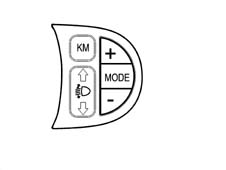
MODE KEY
1 short press (t < 1 s) = Mode1:
- menu activation and display, if vehicle speed < 3 km/h
- activation of the Speed Limit function, if vehicle speed > 3 km/h
- confirmation of the selected function
- confirmation of the setting/modification and return to themain menu screen (same option)
1 long press (t <>2 s) = Mode2:
- stores the modifications confirmed by the short press and returns to the standard screen
"+" / "-" KEYS:
- selection of the main functions
- setting/adjustment of functions in the Speed Limit MENU
- Dimmer adjustment (if activated with inactive MENU functions)
Not all the functions can be activated during the fault message display cycles
Example of use of MODE "+" and "-" keys
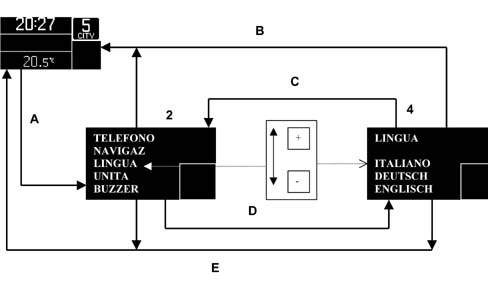
1 - standard screen
2 - set-up menu screen (choice of functions)
3 - selection keys on left keypad
4 - submenu screen (choice of subfunctions)
In detail:
The first time the MODE (A) key is pressed (with vehicle speed < 3 km/h), the screen page opens (2) with all the main functions (main menu).
The number of functions displayed is lower than the total number of functions, depending on the available display area (e.g. 1 to 5, 2 to 6, 3 to 7 and so on)
The current active function is displayed in reverse mode (contrast opposite to that of the other functions).
To select the main function required, use the "+" or "-" keys (3) and confirm the choice with the Mode key (D).
At this point, the subfunction screen appears and these are displayed in sequential manner.
The subfunction screen can contain several subfunctions (e.g. the Clock subfunctions are: Hours and Minutes)
To select the required subfunction, always use the "+" or "-" keys (3).
Press the MODE key (Mode 1) (C) to confirm the choice and restore the menu screen.
After selecting and activating all the required functions by repeating the procedure described for each function, two options are available for returning to the standard screen.
The first is activated immediately after selecting/activating the last function considered by simply pressing the MODE key (mode 2) (B) for longer than 2 seconds.
The second allows the user to return to the standard screen at any moment provided no operations (selection/activation) are performed for at least 10 seconds (E). In this case, only actions that were previously activated using the MODE key are stored.
The functions and subfunctions that can be activated using the mode keys are listed below.
Speed
Used to adjust the speed limit.
The subfunctions can be used to:
- turn functions off/on by means of the OFF/ON position
- adjust the speed limit (lower speed limit equal to 30 km/h)
- The function is active even when vehicle speed > 3 km/h
Trip-b
Used to activate or deactivate the trip computer TRIP-B function
The subfunction can be used to turn the function on/off using the ON/OFF position
Clock
Used to adjust the internal clock
The subfunctions can be used to:
- adjust time
- adjust minutes
Date
Used to adjust the date
The subfunctions can be used to:
- adjust the date
- adjust the month
- adjust the year
Summer time
Used to activate summer time (+ 1 hour)
The subfunctions can be used to:
- turn the function off/on by means of the OFF/ON position
Mode 12/24
Used to adjust the clock to the 12 hour or 24 hour mode
The subfunctions can be used to:
- adjust the clock to 12 hours (AM/PM)
- adjust the clock to 24 hours
Radio
Used to activate repetition of radio data (if present)
The subfunctions can be used to:
- turn the function off/on by means of the OFF/ON position
Navigator
Used to activate repetition of NAVIGATION SYSTEM data (if present)
The subfunctions can be used to:
- turn the function off/on by means of the OFF/ON position
Telephone
Used to activate repetition of TELEPHONE data (if present)
The subfunctions can be used to:
- turn the function off/on by means of the OFF/ON position
Language
Used to select the language used for control panel messages and also used for all users that show written messages and are connected to the CAN network, e.g. the NIT
The subfunctions can be used to select the required language.
The panel is programmed for the following languages:
- ITALIAN
- GERMAN
- ENGLISH
- SPANISH
- FRENCH
- DUTCH
Units
Used to select the measurement units for the panel and for all other users connected to the CAN network, e.g. climate control and TRIP computer
The subfunctions can be used to select the required units.
The units are as follows:
- km / miles (TRIP distance)
- °C / °F (temperature)
- l/100km _km/l _ mpg (fuel consumption)
Buzzer
Used to set BUZZER intensity
The subfunction may be used to adjust BUZZER volume percentage (see specific chapter)
Service
Used to display SERVICE function options
The subfunction can be used to display:
- the time until the next service is due
- front tyre pressure in bars
- rear tyre pressure in bars
- engine oil type
- brake fluid type
- coolant type
- the message "see owner handbook for further information"
Menu off
Used to exit the main menu (contains no subfunctions).
Parts & tools for this job Staging For 2003 Alfa Romeo GT
- TOOLDigital multimeterSearch: automotive digital multimeter
- PARTAssorted fuse kitSearch: car fuse assortment kit
- TOOLWire crimper and connector kitSearch: wire crimper connector kit
Links open Amazon search results in a new tab. As an Amazon Associate I earn from qualifying purchases.