
Gsm aerial operation check
- Make
- Fiat
- Model
- Panda Factory Service Manual
- Year
- 2003–2012
- Section
- Special accessories › Gsm aerial operation check
GSM AERIAL OPERATION CHECK
- Place the vehicle somewhere where the GSN field level is sufficient.
- In this case, from the moment the Connect displays the field the GSM aerial connection is also checked.
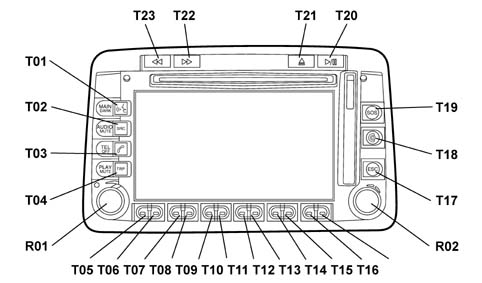
- Extract the SIM holder housing located on the top right of the Connect screen by pressing the button above it.
- Insert the SIM card with the gold part facing the left side of the vehicle.
- Turn the ignition key to the ON position.
- Press the left knob (R01) to switch the CONNECT on.
- Press the "TEL" button (T03) to activate the telephone application, check that the following screen is shown on the display, that the telephone is enabled and that the display automatically shows the field level and the service provider connected to (which depends on the test SIM card) by the specific symbol.
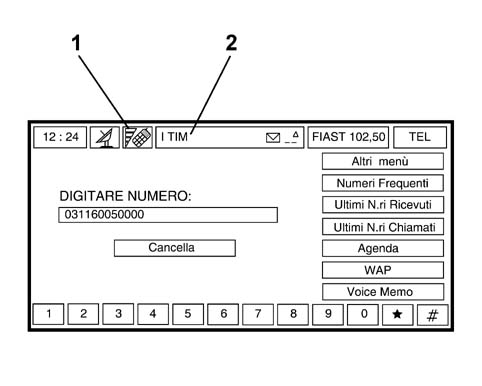
1. Field level reading
2. Telephone service provider
- A positive result for the operation described above confirms that the GSM aerial has been correctly installed.
Parts & tools for this job Staging For 2003 Fiat Panda
- TOOLDigital multimeterSearch: automotive digital multimeter
- PARTAssorted fuse kitSearch: car fuse assortment kit
- TOOLWire crimper and connector kitSearch: wire crimper connector kit
Links open Amazon search results in a new tab. As an Amazon Associate I earn from qualifying purchases.