
Connect autodiagnostic procedure
- Make
- Alfa Romeo
- Model
- Brera and Spider Factory Service Manual
- Year
- 2005–2010
- Section
- Special accessories › Connect autodiagnostic procedure
CONNECT AUTODIAGNOSTIC PROCEDURE
Turn the key to the ON position.
Press the left knob to switch the CONNECT on.
Check that the display comes on.
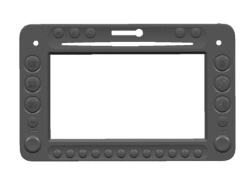
Check that all the buttons/knobs for the CONNECT in the front panel are lit up.
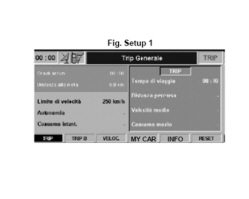
Press TRIP button.
Check that the Setup screen 1 appears on the display:
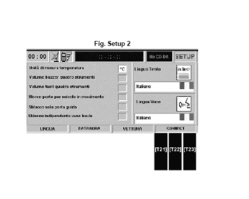
- Press one of the reconfigurable buttons for the MY CAR item to access the Connect SETUP menu.
Check that the Setup screen 2 appears on the display:
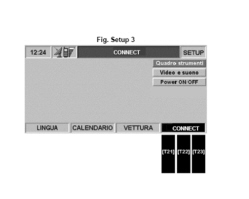
- Press one of the following three reconfigurable buttons [T21] or [T22] pr [T23] for the CONNECT item to access the NITt SETUP menu.
Check that the Setup screen 3 appears on the display
- Press button [T21] or [T22] pr [T23] for the CONNECT item three consecutive times.
Press the right knob (R02) and check that screen 4 with the item "Assistance" appears on the display:
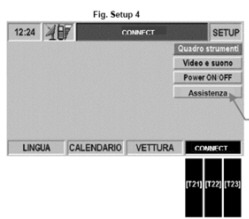
- Turn the right knob to select the item "Assistance" from the menu.
- Press the right knob to confirm and access the diagnostic data.
Check that the Setup screen 5 appears on the display (Diagnosis: speaker test):
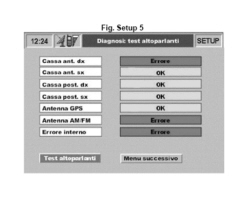
The first part of the results of the tests carried out during self-diagnosis is displayed. The test outcome is shown for each outcome (e.g.: OK or ERROR).
Check the connections for the 4 audio channels for the four items in the list.
- Turn the right knob (R02) to select the "Next menu" item.
- Press the right knob (R02) to confirm, then check that the screen in Setup Fig. 6 is shown on the display:
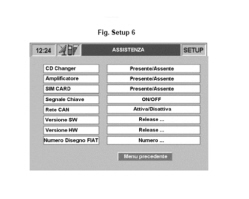
The second part of the results of the tests carried out during self-diagnosis is displayed.
The result of the test is indicated for each item (Present/Absent, Activated/Deactivated or On/Off);
Check the CD Changer connection, only if this feature is included as an option in the vehicle specification.
Check the HI-FI Amplifier connection, only if this feature is included as an option in the vehicle specification.
Parts & tools for this job Staging For 2005 Alfa Romeo Brera
- TOOLDigital multimeterSearch: automotive digital multimeter
- PARTAssorted fuse kitSearch: car fuse assortment kit
- TOOLWire crimper and connector kitSearch: wire crimper connector kit
Links open Amazon search results in a new tab. As an Amazon Associate I earn from qualifying purchases.