
Accessories
- Make
- Alfa Romeo
- Model
- Brera and Spider Factory Service Manual
- Year
- 2005–2010
- Section
- General › Accessories
ACCESSORIES
RADIO
Specifications
Dimensions: 1 DIN box with 2 DIN front panel.
Modules included:
- Radio
- Audio CD player + CD ROM with MP3
- LCD graphic display
- External CD Changer system (if present).
- Connection with Bluetooth control unit for reproduction of musical files (MP3).
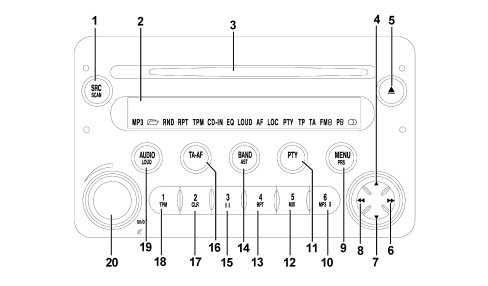
Technical specifications
The technical specifications are listed below:
GENERAL SPECIFICATIONS:
- music audio power: 4x35W
- 5 band graphic equalizer
- easy to manage menu for the adjustment of the radio settings and any external interfaces (CD-Changer)
- remote control from the steering wheel
- possibility of interface with outside CD Changer
- volume control according to the speed (via CAN)
- possibility of activating certain commands via voice recognition module.
RADIO SPECIFICATIONS:
- RDS
- RDS - TMC (Traffic Message Channel)
- EON (Enhanced Other Network)
- TA (Traffic Announcements)
- band tuning: USW (FM); MW; LW
- possibility of programming:
- 24 FM stations (6 of which can be memorized through autostore on the AMST band);
- 6 MW stations;
- 6 LW stations;
- 6 stations that can be memorized through autostore on the AMST band
- 2 scan modes (short lislten to a station and automatic transfer to the next):
- scanning the frequency band used;
- scanning programmed stations.
- possibility of selecting programmes via PTY (on FM bands only).
- local/distant setting.
AUDIO SPECIFICATIONS:
- bass
- balance
- fader
- loudness
- treble
- Hi-Fi system active control
- 5 equalizing curves:
- best (manufacturer''s equalizing data);
- rock;
- jazz;
- classical;
- manual (can be set via 5 band graphic equalizer)
- soft mute.
CD SPECIFICATIONS:
- motorized loading and ejection
- TPM function (Track Program Memory)
- shuffle function
- repeat
- skip
- pause / stop
- compression: activates the dynamic compression circuit
- CD naming: CD identification (20 max)
CD MP3 SPECIFICATIONS:
- play list function (such as TPM for audio CD)
- functions associated with the play list:
- scan;
- repeat (one track or all);
- pause;
- skip
- maximum number of MP3 tracks considered for each CD: 999 (if the number of MP3 files contained in the CD ROM is higher than this limit, only the first 999 will be considered).
- compression: activates the CD noise dynamic reduction circuit.
Blaupunkt 10 disc CD changer specifications (in the luggage compartment):
- scan function
- repeat function
- shuffle function
- CD naming
- compression: activates the dynamic reduction circuit.
Operation
The table below contains all the functions that can be activated; (a) = short press (less than 2 secs.), (b) = long press (more than 2 secs.).
| Button | Symbol | RADIO mode | CD/MP3 mode | CD Changer mode |
|---|---|---|---|---|
| 1 | SRC-SCAN | (a) CD, CD Changer (if connected) or Radio selection (b) Scan of FM/AM radio stations | (a) CD, CD Changer (if connected) selection (b) Scan of tracks on CD | (a) CD, CD Changer selection (if connected) or Radio (b) Scan of CDs in CD Changer |
| 2 | Display | |||
| 3 | (compartment CD) | |||
| 4 | "up" | Automatic station search TP: search + PTY: search + AF: search + | (a) Selection of next CD (b) Selection of next CD continuously | |
| 5 | “eject” | Eject CD | Eject CD | Eject CD |
| 6 | "ffw" | Manual station search TP: search + PTY: search + AF: search + | (a) Selection of next track (b) Track fast forward | |
| 7 | "down" | Automatic station search TP: search - PTY: search - AF: search - | (a) Selection of previous CD (b) Selection of next CD | |
| 8 | "rw" | Manual station search TP: search - PTY: search - AF: search - | (a) Return to beginning of track/selection of previous track (b) Track fast rewind | (a) Return to beginning of track/ select previous track (b) Track fast rewind |
| 9 | MENU-PRS | (a) Menu activation/deactivation (b) Preset station scan | (a) Menu activation/deactivation | (a) Activation/deactivation Menu |
| 10 | 6-MP3 | FM/AM: station recall preselection 6 | (a) Display data selected | |
| 11 | PTY | (a) PTY ON/OFF (b) PTY: display programme type selected | (a) PTY ON/OFF | (a) PTY ON/OFF |
| 12 | 5-MIX | (a) FM/AM: station recall preselection 5 (b) FM/AM: programme station preselection 5 | (a) Activation/deactivation MIX function | (a) Activation/deactivation MIX function |
| 13 | 4-RPT | (a) FM/AM: station recall preselection 4 (b) FM/AM: programme station preselection 4 | (a) Activation/deactivation REPEAT function | (a) Activation/deactivation REPEAT function |
| 14 | BAND-AST | (a) FM1, FM2, FMT, MW, LW (b) Automatic programming in the FMT station group | (b) Automatic programming in the FMT station group | (b) Automatic programming in the FMT station group |
| 15 | 3-II | (a) FM/AM: station recall preselection 3 (b) FM/AM: programme station preselection 3 | (a) Activation/deactivation of pause CD reproduction | (a) Activation/deactivation CD reproduction pause |
| 16 | TA-AF | (a) TA ON/OFF (b) AF ON/OFF | (a) TA ON/OFF (b) AF ON/OFF | (a) TA ON/OFF (b) AF ON/OFF |
| 17 | 2-CLR | (a) FM/AM: station recall preselection 2 (b) FM/AM: programme station preselection 2 | (b) Cancel programming tracks on CD selected | |
| 18 | 1-TPM | (a) FM/AM: station recall preselection 1 (b) FM/AM: programme station preselection 1 | (a) Activation/deactivation TPM function (b) Track programming desired | |
| 19 | AUDIO-LOUD | (a) Bass (B) Treble (T) Fader (F) Balance (B) (b) Activation/deactivation Loudness | (a) Bass (B) Treble (T) Fader (F) Balance (B) (b) Activation/deactivation Loudness | (a) Bass (B) Treble (T) Fader (F) Balance (B) (b) Activation/deactivation Loudness |
| 20 | on/off “MUTE” | (a) With radio on: activation/deactivation Audio Mute With radio off: radio on Volume adjustment: turn to the left: decrease turn to the right: increase (b) With radio on: switch off With radio on: switch on |
Anti-theft code
The radio is installed in production and is connected to the CAN in order to establish communication with the Body Computer memorizing an anti-theft code known as an Exchanger Code.
At each subsequent Key On (and even if the battery is disconnected), an automatic authentication procedure is repeated: the words "CAN CHECK" appear in the radio display: if the Exchange Code check is positive, the system begins to operate. If the codes compared are not the same, a message appears on the display asking the user to enter a manual code (Master Code - 4-figure code from 1111 to 6666) that is shown on the radio code card.
The Master Code is pre-programmed in production and is different for each radio and is also not the same as the Exchanger Code.
The manual procedure for entering the Master Code is only necessary if: replacing the Body Computer for a radio already used on another vehicle with a CAN.
A "new" radio (never previously fitted on other vehicles) can be fitted following an automatic authentication procedure without manually entering the Master Code.
Operation at key off
If the radio is on at the time of the Key off (start/stop button pressed, but TEG still inserted) it is switched off automatically after 20 minutes; it is however possible to keep it on for another 20 minutes by pressing the ON button again.
This timeout can be deleted using the radio set up menu and the radio will switch off immediately; it can, however, be switched on for 20 minutes by pressing the ON button again.
In the setup menu under the item "- - - I G N I T I O N - T I M E R - - -".
the following can be selected
"- - O F F - A F T E R - 0 0 - M I N - -"
"- - O F F - A F T E R - 20 - M I N - -"
If, on the other hand, the TEG is extracted after the Key off, the radio will be switched off immediately.
Connectors
Rear view:
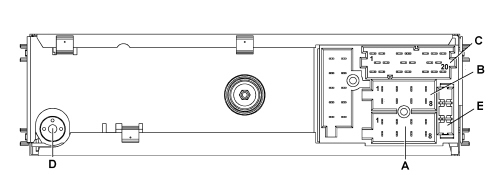
A - Supply connector
B - Speaker output connector
C - Auxiliary functions connector
D - Aerial connection
E - 10 A fuse
Connector pin out
Connector A:
| Pin | Function |
|---|---|
| A1 | B CAN B |
| A2 | BOSE amplifier presence positive signal |
| A3 | B CAN A |
| A4 | Direct power supply |
| A5 | Aerial supply (N.C.) |
| A6 | Side lights on lighting (N.C.) |
| A7 | N.C. |
| A8 | Earth |
Connector B:
| Pin | Function |
|---|---|
| B1 | Right rear speaker + |
| B2 | Right rear speaker - |
| B3 | Right front speaker + |
| B4 | Right front speaker - |
| B5 | Left front speaker + |
| B6 | Left front speaker - |
| B7 | Left rear speaker + |
| B8 | Left rear speaker - |
Connector C/D/E:
| Pin | Function |
|---|---|
| C1 | Left AUX signal |
| C2 | Right AUX signal |
| C3 | AUX earth |
| C4 | N.C. |
| C5 | N.C. |
| C6 | Positive signal for amplifier enablement |
| D7 | Telephone audio in + (version without Media Player) |
| D8 | Telephone audio in - (version without Media Player) |
| D9 | Telephone mute (version without Media Player) |
| D10 | N.C. |
| D11 | N.C. |
| D12 | Mute (N.C.) |
| E13 | CDC data IN |
| E14 | CDC data OUT |
| E15 | Permanent power supply for CDC |
| E16 | Positive signal for CDC power supply enablement |
| E17 | CDC data GND |
| E18 | CDC audio GND |
| E19 | L input for CDC |
| E20 | R input for CDC |
SPEAKERS
Location
The location of the components is illustrated below.
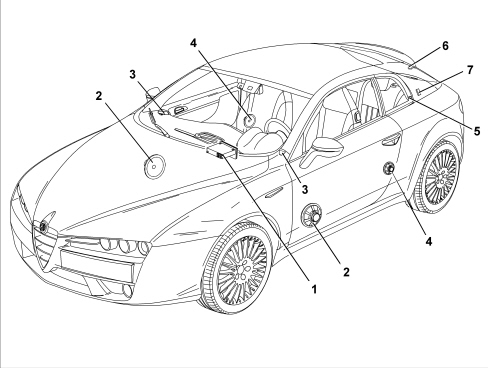
1 - Radio
2 - Front door midwoofer speakers
3 - Tweeter front speakers
4 - Rear speakers
5 - AM aerial in side window
6 - FM aerial in rear window
7 - Aerial amplifier
Front tweeter speakers
The tweeter speaker has the function of emphasizing the high tones that are produced through a polyurethane diaphragm, the copper moving coil support and insulator and the steel plus rare earth magnetic assembly.
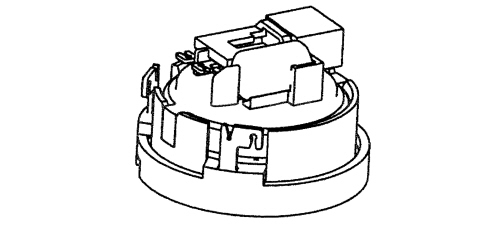
Its electrical specifications are:
- 38 mm diameter
- 4000/20000 Hz band
- resonance frequency 1500 Hz +/- 15%
- nominal impedance 4 OHM
- power RMS 20 W
- max power 30 W
The front tweeters are located in the dashboard.
Front mid-woofer speaker
The mid-woofer speaker has the function of emphasizing the low tones produced by a treated paper diaphragm, treated cloth element, treated paper dust cover and aluminium/paper moving coil support.
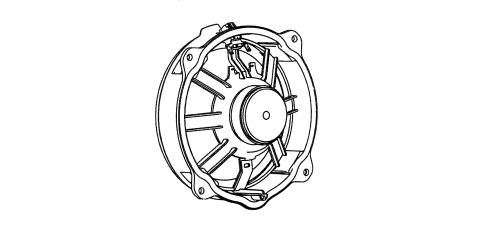
Its electrical specifications are:
- 170 mm diameter
- 50/8000 Hz band
- resonance frequency 65 Hz +/- 15%
- nominal impedance 4 OHM
- RSM power 20W
- MAX power 40W
The front mid-woofers are fitted in the lower part of the door.
Rear speaker
The full range speaker has the function of reproducing all the tones; it is made of a treated paper diaphragm, a treated cloth element, a treated paper dust cover and an aluminium/paper moving coil support.

Its electrical specifications are:
- 80 mm diameter
- 1600/16000 Hz band
- resonance frequency 170 Hz +/- 15%
- nominal impedance 4 OHM
- RSM power 20W
- MAX power 25W
The rear mid-woofers are fitted in the lower part of the side panel.
Recommendations for fitting the speakers
In order not to damage the speakers certain precautions must be taken when fitting and moving them.
The following operations are not advisable:
- Stacking the speakers on top of one another when unpacking.
- Placing the speakers near ferrous metal parts. In the case of very small parts they could get in through the gap and produce noise.
- Twist the terminals once the electrical connection is fitted.
- Rest on the speaker diaphragm during the fitting stages.
- Puncture the speaker diaphragm with a screwdriver whilst fitting.
- Twist the cone (take care, it is one of the most delicate parts).
- Never place the speaker in contact with solvents or derivatives.
The following operations are advisable:
- Always handle the speaker using the plastic structure without twisting the diaphragm and other moving parts.
- Discard speakers that have been subject to impacts and appear to be distorted.
- Remove any protective shields before fitting on the vehicle.
AERIALS
The structure of the aerials consists of:
- AM aerial comprising serigraphy on the right rear side window;
- FM aerial which uses the heater elements of the heated rear windscreen;
- telephone (GSM) and navigation (GPS) aerial on the roof;
See descriptions 5580P CONNECT PANEL
- navigation only aerial (GPS) concealed in the roof trim.
The AM/FM system comprises an AM and FM amplifier where the AM signal arrivs from the serigraphy in the right rear side window via a unipolar cable whilst the FM signal arrives from the heated rear windscreen filaments via a coaxial cable with screening earthed at the tailgate right near the connection to the serigraphy.
The cable that carries the signal to the radio module leaves the AM/FM amplifier.
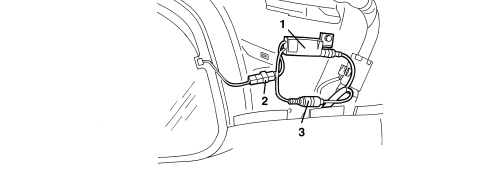
1 - amplifier
2 - AM signal connection from side window serigraphy
3 - FM signal connection from the heated rear windscreen filaments
CD Changer
A special Blaupunkt CD Changer cartridge allows up to 10 CDs to be loaded which are then selected through the radio controls. The cartridge only works if it contains at least one CD, the CDs must be correctly inserted and the flap properly shut.
The CD Changer is located in the luggage compartment in the area of the right wheel arch.
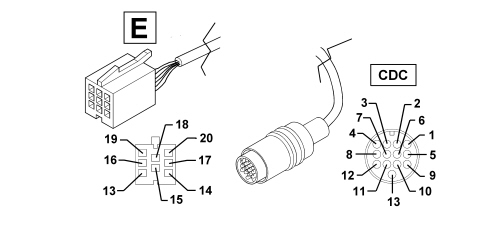
It is connected to the radio by means of a specific lead, divided into two sections: one under the dashboard and one under the passenger compartment trim.
Cd changer lead
Connector E (of the radio)
| PIN | SIGNAL |
|---|---|
| 13 | CDC data IN |
| 14 | CDC data OUT |
| 15 | Permanent power supply for CDC |
| 16 | Positive signal for CDC power supply enablement |
| 17 | CDC data GND |
| 18 | CDC audio GND |
| 19 | L input for CDC |
| 20 | R input for CDC |
"CDC" rapid attachment connector, CD Changer side
| PIN | SIGNAL |
|---|---|
| 2 | Earth |
| 3 | Permanent power supply |
| 4 | Switched power supply |
| 6 | Audio earth |
| 8 | Left audio IN |
| 10 | ASCI bus CDC - radio |
| 12 | Right audio IN |
| 13 | ASCI bus radio - CDC |
BOSE HIFI AUDIO SYSTEM
Specifications
A sophisticated Bose HIFI system with special HIFI speakers and an outside amplifier is available on request.
The system has been developed ad hoc for the vehicle: the acoustic properties of the passenger compartment have been carefully studied so that the amplifier and the speakers are ideally suited to the vehicle: optimum listening is available in any part of the passenger compartment.
The system is also in perfect harmony with the aesthetics of the vehicle without taking up additional space.
The system is installed on the vehicle directly during production with no subsequent operations: the cables are integrated in the vehicle wiring.
It is therefore not advisable to make any changes to the original system (e.g. graphic equalizers, additional woofers, extra amplifiers). In addition, the system components (amplifier and speakers) should not be repaired individually, but should be replaced with new components.
Performance
The Bose system guarantees the highest quality sound with pure treble and rich bass tones with the following specifications:
- Adjusting the volume, through equalization "activates" the Bose system.
- Treble/bass control from + 6 dB to -12 dB.
- Fader control, through the Bose "spatial" fader.
Composition
Unlike the system fitted as standard, the Bose system offers:
- special tweeter and low-mid-range front speakers
- centre rear woofer speaker
- mid-range centerfill speakers in the dashboard and in the rear side panels
- high power amplifier.
The other components (radio, aerial, etc.) are the same as the standard system.
The location of the components is illustrated below.
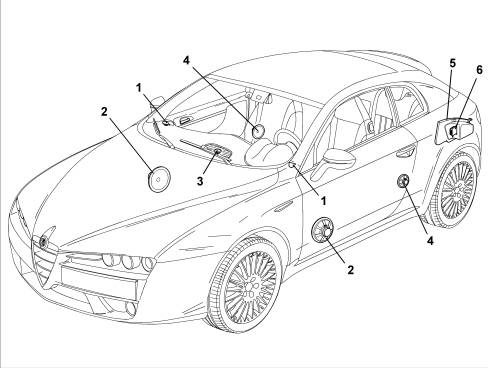
1 - Front tweeter speakers
2 - Front door mid-woofer speakers
3 - Centerfill speaker in the dashboard
4 - Rear centerfill speakers
5 - Rear woofer speaker
6 - Amplifier
Speakers
BOSE hi fidelity speakers are made up of a neodyme magnetic core, with a treated paper diaphragm and a textile mounting. The moving coil support is made of aluminium.
In addition to the four speakers in the standard system (low-mid-range in the front doors with specific tweeters) the Bose Sound System also includes:
Centerfill speakers in the dashboard and rear panels
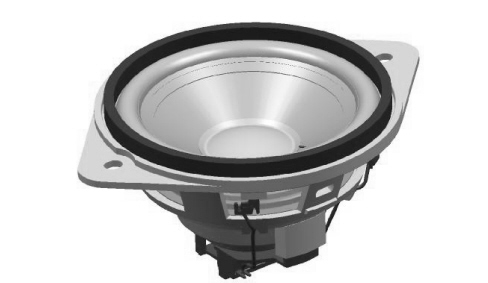
They are high-mid range (80 mm diameter) speakers; the one in the dashboard, exactly in the centre line of the vehicle, considerably improves the stereo effect of the sound; the two located in the rear panels are excellent at diffusing the sound for the rear passengers.
Amplifier
This is a SERIES 5000 high fidelity amplifer with 6 channels with a total power output of 6x37 W. It is located in the luggage compartment as illustrated.
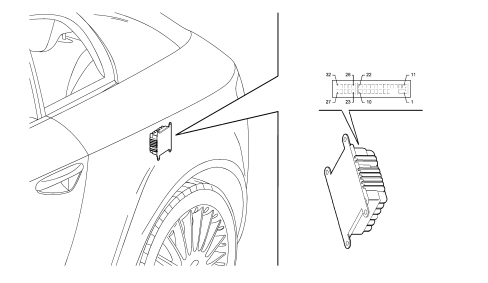
AMPLIFIER CONNECTION PIN OUT
| PIN | SIGNAL |
|---|---|
| 1 | +30 |
| 2 | earth |
| 3 | + centerfill |
| 4 | left rear speaker - |
| 5 | right rear speaker + |
| 6 | enablement (positive signal) from car radio |
| 7 | left front speaker - |
| 8 | right front speaker - |
| 9 | left rear speaker - |
| 10 | right rear speaker - |
| 11 | rear woofer + |
| 12 | rear woofer - |
| 13 | n.c. |
| 14 | n.c. |
| 15 | - centerfill |
| 16 | left rear speaker + |
| 17 | right rear speaker - |
| 18 | n.c. |
| 19 | left front speaker + |
| 20 | right front speaker + |
| 21 | left rear speaker + |
| 22 | right rear speaker + |
| 23 | n.c. |
| 24 | n.c. |
| 25 | rear woofer power supply |
| 26 | right front speaker - |
| 27 | right front speaker + |
| 28 | n.c. |
| 29 | + microphone |
| 30 | - microphone |
| 31 | left front speaker + |
| 32 | left front speaker - |
BLUETOOTH HANDS-FREE SYSTEM
The hands-free system for Bluetooth mobile phones - incorporated in the vehicle dashboard - makes it possible to use a mobile phone in the vehicle, with protection of the security and functionality for the final user.
The C1 version control unit includes the following modules:
- Bluetooth receiver
- voice recognition integrated module including microphone
- Text to Speech integrated module
- USB interface for Media Player
The alphanumerical display used for text messages is the one for the control panel.
See descriptions 5560 INSTRUMENTS
An example of a screen is illustrated.

The control unit is then connected to the controls on the steering (in addition to the radio control buttons there are 2 specific buttons for this function).
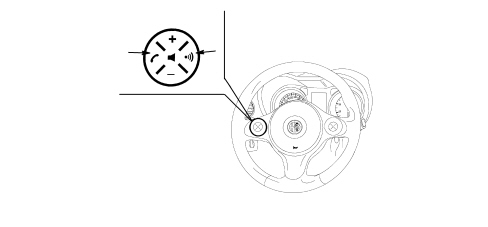
Connection with bluetooth telephone
The system is connected to a mobile phone with a Bluetooth interface and hands-free profile.
The mobile phone - control unit connection takes place via the 2.4 GHz bluetooth radio channel: for this reason the device is installed in a position that makes direct visibility of the vehicle passenger compartment easy.
The first connection between the mobile phone and the device (pairing procedure) is regulated by a password; the user connects by keying in the password into their own mobile phone in the menu for Bluetooth connections.
It is possible to memorize up to 5 users who are connected automatically at subsequent keys on without manual intervention on behalf of the actual user.
In each case, only one mobile phone can be connected to the control unit via Bluetooth.
The operation of the control unit is linked to the availability of the user''s mobile phone for Bluetooth hands-free profiles, in particular:
- the Bluetooth system comes on independently at the Key on and starts the search for Bluetooth (mobile) devices to connect with immediately.
- the equipment switches off independently at the Key off releasing any Bluetooth connection that may be activated: there is a delay of 30 seconds (provisional figure) to suppress accidental switching off of the engine (in traffic, at traffic lights, etc.0.
- if a phonecall is in progress, the conversation is kept activated (except for the display in the control panel) even after the car is switched off; the control unit and the radio finally switch off at the end of the conversation.
List of compatible mobile phones
The current hands-free system with Bluetooth technology is compatible with all mobile phones that support Bluetooth 1.1 and a 1.0 hands-free probile (refer to the Bluetooth connection specifications in the mobile phone user manual).
As a result of the different possible software versions available on the market for different models of mobile phone, some additional functions (e.g.: second call management, call transfer from hands-free system to mobile phone and vice versa, etc.) may not correspond exactly to the description in the mobile phone user manual.
In any case, the possibility of carrying out a hands-free conversation will not be compromised.
The table below contains the mobile phones that, at the time this manual is published, have undergone a thorough check on operation with the current Bluetooth hands-free system:
| Make | Model | Automatic directory management (1) | Management of individual contacts (2) |
|---|---|---|---|
| Audiovox | SMT 5600 | X | |
| Orange C500 (*) | X | ||
| Motorola | V525 - V600 (*) | X | |
| Mpx 220 (**) | X | ||
| Nokia | 6230 | X | |
| 6600 (***) | X | ||
| 6820 | X | ||
| 7610 (*) | X | ||
| Sony-Ericsson | K700 i | X | |
| T610 (**) | X | ||
| T637 (**) | X | ||
| Z600 (**) | X |
(1) these mobile phones support automatic transmission of the telephone directory: the entire directory will be automatically copied to the hands-free system during the registration procedure
(2) these mobile phones support automatic transmission of the individual contacts in the telephone directory: during the registration procedure the transfer of names in the telephone list from the mobile phone will be requested
(*) these mobile phones do not manage the GPRS function
(***) these mobile phones do not manage a conference call function
(***) these mobile phones do not manage a call waiting function
Operating procedures
Incoming call:
- when a signal of an incoming call reaches the phone: the radio is turned to mute, the ringing of the mobile phone is produced through the speakers and the number/name of the caller (if available) is shown on the instrument panel display
- at this point the user can accept or reject the call
- during the conversation the user listens to the other person on the radio audio system and speaks via the microphone
- when the conversation is over the radio returns to its status prior to the call (volume, mode, etc.)
When a conversation is in progress, the user can carry out the following operations:
- alter the volume of the conversation using the radio Vol + and Vol - buttons. The level set can be reset at the end of the conversation: the next one will be at the radio default volume.
- move the conversation in progress from the Bluetooth control unit to the mobile phone on (and vice versa) to speak in private (local privacy)
- momentarily interrupt the conversation with the remote user (keeping them on hold) to talk privately with any passenger in the vehicle without being overheard by the user on the line (remote privacy)
- answer another incoming call (during the presence of a CWN signal) and move from one conversation to another
- reject another incoming call (in the presence of a CWN signal).
The last 2 functions in the list are linked to the presence on the GSM network, the user profile and the mobile phone of the necessary specifications and authorizations to manage 2 calls simultaneously.
Outgoing call
The user can make a call in 4 ways
- using their own mobile phone keypad
- using the list of recent calls
- using their own mobile phone list
- dictating the number they wish to call.
Media player
Starting from February 06 the Media Player function will be available in other words listening to MP3 / WMA files on the radio via the control unit
The oddments compartment contains a USB connector in which the customer can insert their own USB Pen with music files.
The function is mainly managed through voice commands.
System components
The main components of the C1 version system with Bluetooth mobile phone management are:
- Bluetooth electronic control unit
- microphone
- steering wheel controls
- USB socket for Media Player connection
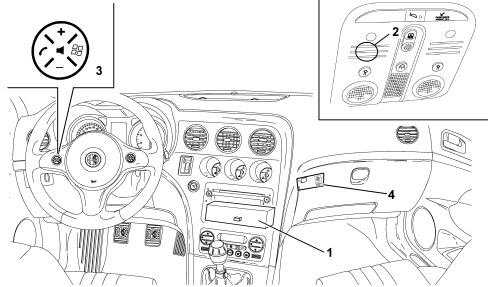
1 - electronic control unit
2 - microphone
3 - controls on the steering wheel
4 - USB - Media Player socket
Control unit connections
The control unit is connected via the B-CAN to the radio node and the Body Computer which, in turn, is connected to the controls on the steering wheel.
Each piece of equipment responds to its own commands depending on the button activated and the operating mode activated at the time (in this case the Bluetooth control unit inhibits the radio from carrying out commands from the CAN when the hands-free function is activated).
Bluetooth control unit pin out
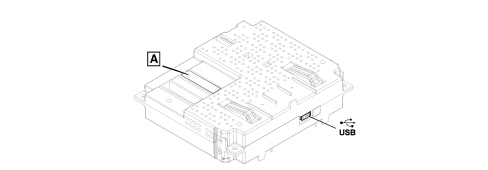
- USB: USB socket used with Examiner
- connector A
| PIN | SIGNAL |
|---|---|
| 3 | D+ signal for USB |
| 4 | reference earth for USB |
| 5 | left AUX signal |
| 7 | telephone audio + |
| 8 | -+ microphone |
| 14 | B-CAN A |
| 15 | earth |
| 16 | direct power supply |
| 19 | D- signal for USB |
| 20 | 5V power supply for USB |
| 21 | AUX earth |
| 22 | right AUX signal |
| 23 | telephone audio - |
| 24 | - microphone screened earth |
| 25 | Phone mute |
| 30 | B-CAN B |
| 31 | - screening for USB |
| 32 | ignition-operated power supply |
Service operations for the system
Fault diagnosis
The control unit is connected via the B-CAN to the radio node and the Body Computer; therefore the diagnostic activities are carried out, in the same way as for all the other CAN "nodes", via the special diagnostic socket and the Examiner equipment.
For other types of repair operations to the system, a special operating system must be temporarily installed on the Examiner, following the instructions given below and a USB "pen" must be inserted in the special control unit socket.
the outer USB socket for the Media Player mode CANNOT be used.
ALTERNATIVELY, THESE OPERATIONS CAN BE CARRIED OUT USING A PERSONAL COMPUTER, OPERATING UNDER "WINDOWS XP" or "WINDOWS 2000".
The following operations can be carried out using this method:
- language change for voice messages;
- software update.
USB pen: The USB "pen" to be used should have the following specifications: USB standard version 1.0, 1.1 or 2.0 with minimum memory of 256 MB, compatible with "WINDOWS XP" or "WINDOWS 2000".
Whilst this "pen" is being used for the above mentioned operations, it will be "formatted" and therefore all data stored in it previously will be lost !
Languages
The following languages are available, both for the text strings displayed (menu) and for the voice recognition and text to speech messages:
- French
- English
- German
- Italian
- European Spanish
- Dutch
- European Portuguese
- Polish
As far as the messages shown on the display are concerned, the languge selected is the one set for the control panel
See descriptions 5560 INSTRUMENTS
As far as the voice recognition and text to speech messages are concerned, the language should be set separately using the Examiner diagnostic equipment using a USB "pen" to be inserted in the special control unit socket.
Proceed following the instructions below.
Software update
Similarly, any control unit software updates should be entered using the Examiner diagnostic equipment with a USB "pen" to be inserted in the special control unit socket.
Proceed following the instructions below
Never disconnect the battery terminals during the software updating or language updating procedure.
Control unit replacement
The battery terminals must be disconnected before removing the old control unit.
The telephone list downloaded onto the Bluetooth control unit is only saved to the RAM which means that if the battery is disconnected all phone lists downloaded up to that time will be immediately lost. Later on the Bluetooth control unit will reload the actual list.
Order a new control unit from the Parts Dept. who will send a pristine component. once fitted; the initial default data must be transferred to it by carrying out the "PROXI ALIGNMENT" procedure using the Examiner.
Once a new control unit is installed it is necessary to:
- update the software;
- check and, if necessary, set the voice message language correctly;
- carry out the pairing operation for the telephones to be connected.
Op. 5570T49 BLUETOOTH ELECTRONIC CONTROL UNIT - R.R.
Operations using the examiner
To carry out the language change operations for voice messages and software updating, a special operating system must be temporarily installed on the Examiner, using the special "WINDOWS MOBILE FOR AUTOMATIVE EXAMINER CD" CD-ROM supplied together with the traditional Examiner software updates.
In addition, as already pointed out, a USB "pen" is required for transferring the data to the system control unit.
The pen should have the following specifications: USB standard version 1.0, 1.1 or 2.0 with minimum memory of 256 MB, compatible with "WINDOWS XP" or "WINDOWS 2000".
Whilst this "pen" is being used for the above mentioned operations, it will be "formatted" and therefore all data stored in it previously will be lost !
Never disconnect the vehicle battery terminals during all the operations indicated
Always follow the sequence described below (for all of the operations):
- switch on the Examiner following the traditional operating methods
- insert the "WINDOWS MOBILE FOR AUTOMOTIVE EXAMINER CD"
- switch off the Examiner
- insert the USB "pen" in the special port at the back of the Examiner
Warning: the "pen" is NOT "recognized" if it is inserted with the Examiner on.
- restart the Examiner.
At this point the Examiner will work temporarily with the special operating system and it is capable of transferring the data necessary for the following operations to the USB pen:
- individual language setting
- multi language setting
- software update
Only one of these three operations can be carried out at a time; in order to carry out two operations on the same system (e.g. language change and software update) the instructions illustrated previously must be repeated twice separately.
- follow the instructions until the pen preparation operations are completed (the Examiner will advise you)
- remove the USB "pen"
- extract the WINDOWS CD
- switch off the Examiner
ALTERNATIVELY, THESE OPERATIONS CAN BE CARRIED OUT USING A PERSONAL COMPUTER, OPERATING UNDER "WINDOWS XP"
- take the USB "pen" to the vehicle
- with the ignition OFF, insert the USB "pen" in the special Bluetooth control unit port
- turn the ignition key ON
At this point the control unit will carry out the operation requested (language change or software update):
- at the end a display message in the control panel will advise that the operation is over
- check that the operation has been successful (e.g. check the voice message language by giving an instruction).
Never disconnect the vehicle battery terminals during all the operations indicated
Warnings on the use of the system software
This system contains software under licence from Fiat Auto S.p.A. in accordance with a licensing contract. Any removal, reproduction, reverse engineering or other unauthorized use of the software for this system in violation of the licensing contract is strictly prohibited. For more details, consult the owner''s handbook
* Microsoft is a registered make of the Microsoft Corporation.
* Sony is a registered make of the Sony Corporation.
* Ericsson is a registered make of Telefonaktiebolaget LM Ericsson.
* Motorola is a registered make of Motorola, Inc.
* Nokia is a registered make of the Nokia Corporation
* Siemens is a registered make of Siemens AG.
* Orange is a registered make of Orange Personal Communications Services Limited
* Audiovox is a registered make of the Audiovox Corporation.
* Bluetooth is a registered make of Bluetooth SIG, Inc.
Parts & tools for this job Staging For 2005 Alfa Romeo Brera
- TOOLDigital multimeterSearch: automotive digital multimeter
- PARTAssorted fuse kitSearch: car fuse assortment kit
- TOOLWire crimper and connector kitSearch: wire crimper connector kit
Links open Amazon search results in a new tab. As an Amazon Associate I earn from qualifying purchases.